Cloud migration is no longer a future initiative sitting on your IT roadmap — it is a present-day business imperative. According to Gartner’s latest forecast, worldwide public cloud spending will surpass $723 billion in 2025 and continue accelerating through 2026, with enterprise cloud migration driving the majority of that growth.
Yet despite the massive investment, cloud migration remains one of the most complex and risk-prone undertakings an enterprise can pursue. McKinsey estimates that enterprises capture only 10–30% of the potential value from cloud adoption, primarily because of poor migration strategy, inadequate planning, and underestimating the organizational change required.
This comprehensive guide is written for CTOs, IT directors, and enterprise architects who are planning, executing, or struggling with cloud migration services. We cover everything from migration strategy and the six Rs framework to cost optimization, security planning, and choosing the right migration partner — all with practical, actionable advice designed to help you get it right the first time.
The 6 Rs Framework: Choosing the Right Cloud Migration Strategy for Each Application
What Are Cloud Migration Services?
Cloud migration services encompass the full spectrum of planning, execution, and optimization activities required to move an organization’s digital assets — applications, data, infrastructure, and workloads — from on-premises environments to cloud platforms (AWS, Azure, Google Cloud) or between cloud providers.
A comprehensive cloud migration engagement typically includes:
- Discovery and Assessment: Inventorying existing applications, dependencies, data flows, and infrastructure to create a complete migration picture
- Strategy and Roadmap: Defining which workloads to migrate, in what order, using which approach, and on what timeline
- Architecture Design: Designing the target cloud environment — networking, security, compute, storage, and platform services
- Migration Execution: The actual movement of applications, data, and infrastructure to the cloud
- Optimization: Post-migration performance tuning, cost optimization, and operational refinement
- Managed Operations: Ongoing cloud infrastructure management, monitoring, and continuous improvement
The best enterprise software development partners approach cloud migration as a business transformation initiative, not merely a technical lift-and-shift exercise.
The 6 Rs of Cloud Migration: Choosing the Right Strategy
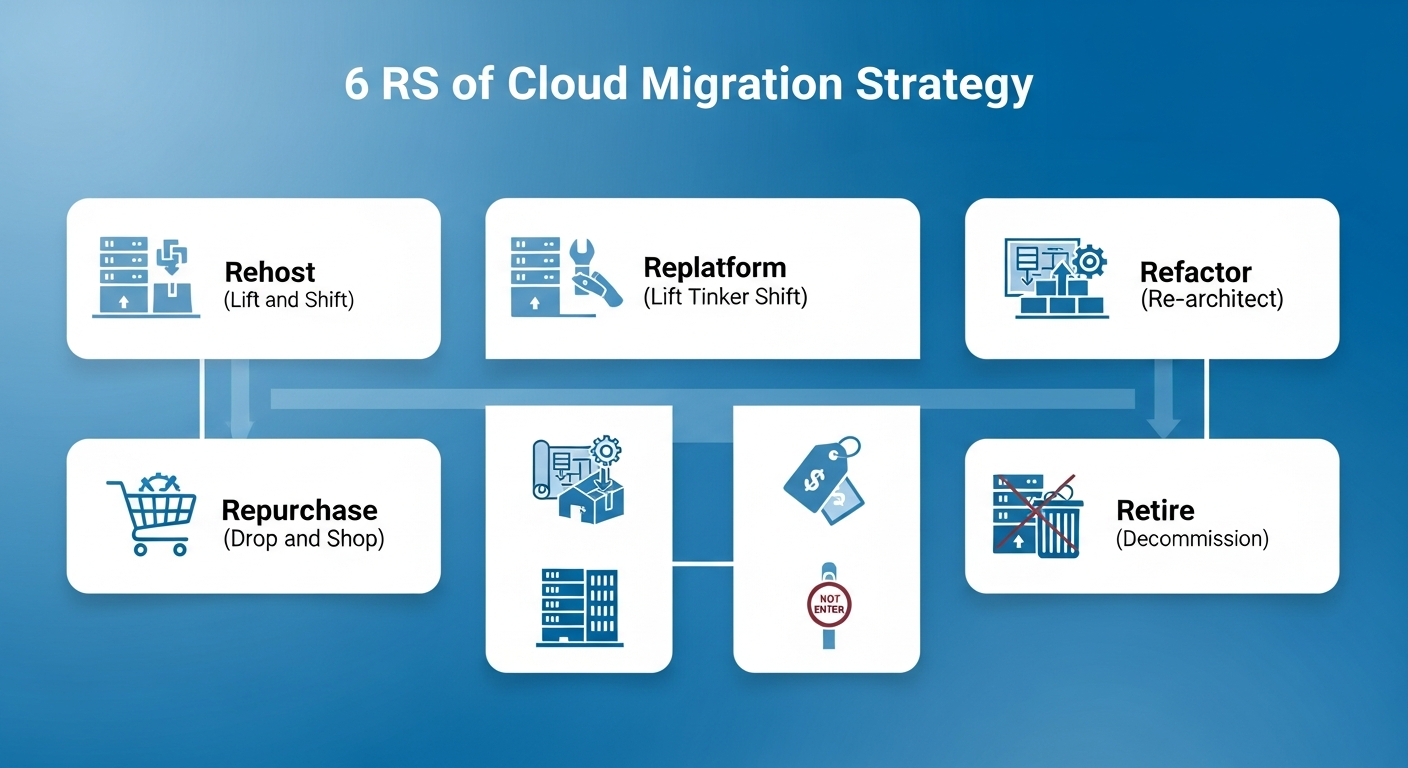
Every application in your portfolio requires a specific migration strategy. AWS originally defined the “6 Rs” framework, which has become the industry-standard approach for categorizing migration strategies:
1. Rehost (Lift and Shift)
What it is: Moving applications to the cloud without modifying code. The application runs on cloud infrastructure exactly as it ran on-premises.
- Best for: Legacy applications with no immediate need for modernization, time-sensitive migrations, applications nearing end-of-life
- Timeline: 2–6 weeks per application
- Cost reduction: 10–20% from infrastructure savings alone
- Risk level: Low — minimal changes mean fewer things to break
2. Replatform (Lift, Tinker, and Shift)
What it is: Making targeted optimizations during migration without changing the core architecture. Examples include moving to managed databases (RDS instead of self-managed MySQL) or using cloud-native load balancers.
- Best for: Applications that can benefit from managed services with minimal code changes
- Timeline: 4–12 weeks per application
- Cost reduction: 20–40% from managed service efficiencies
- Risk level: Low to moderate
3. Refactor / Re-architect
What it is: Redesigning the application to be cloud-native, typically breaking monoliths into microservices, adopting serverless architectures, or implementing containerization.
- Best for: Strategic applications that need scalability, agility, and long-term cost optimization
- Timeline: 3–12 months per application
- Cost reduction: 30–60% long-term, but higher upfront investment
- Risk level: Moderate to high — significant code and architecture changes
4. Repurchase (Drop and Shop)
What it is: Replacing an existing application with a cloud-native SaaS alternative. For example, migrating from on-premises Exchange to Microsoft 365, or from custom CRM to Salesforce.
- Best for: Commodity applications where SaaS alternatives exist, reducing maintenance burden
- Timeline: 4–16 weeks including data migration and training
- Cost impact: Variable — reduces maintenance costs but introduces subscription fees
5. Retain (Revisit Later)
What it is: Keeping certain applications on-premises, either because they are not ready for migration, have regulatory constraints, or provide no clear benefit from cloud hosting.
- Best for: Applications with strict latency requirements, regulatory mandates, or pending retirement
- Decision triggers: Revisit during the next planning cycle (typically 12–18 months)
6. Retire
What it is: Identifying and decommissioning applications that are no longer needed. Most enterprises find that 10–20% of their application portfolio can be retired during a migration assessment.
- Benefit: Reduces migration scope, eliminates licensing and maintenance costs
- Hidden value: Often the highest-ROI decision in the entire migration
The 5-Phase Enterprise Cloud Migration Playbook
Cloud Migration Step-by-Step: The Enterprise Playbook
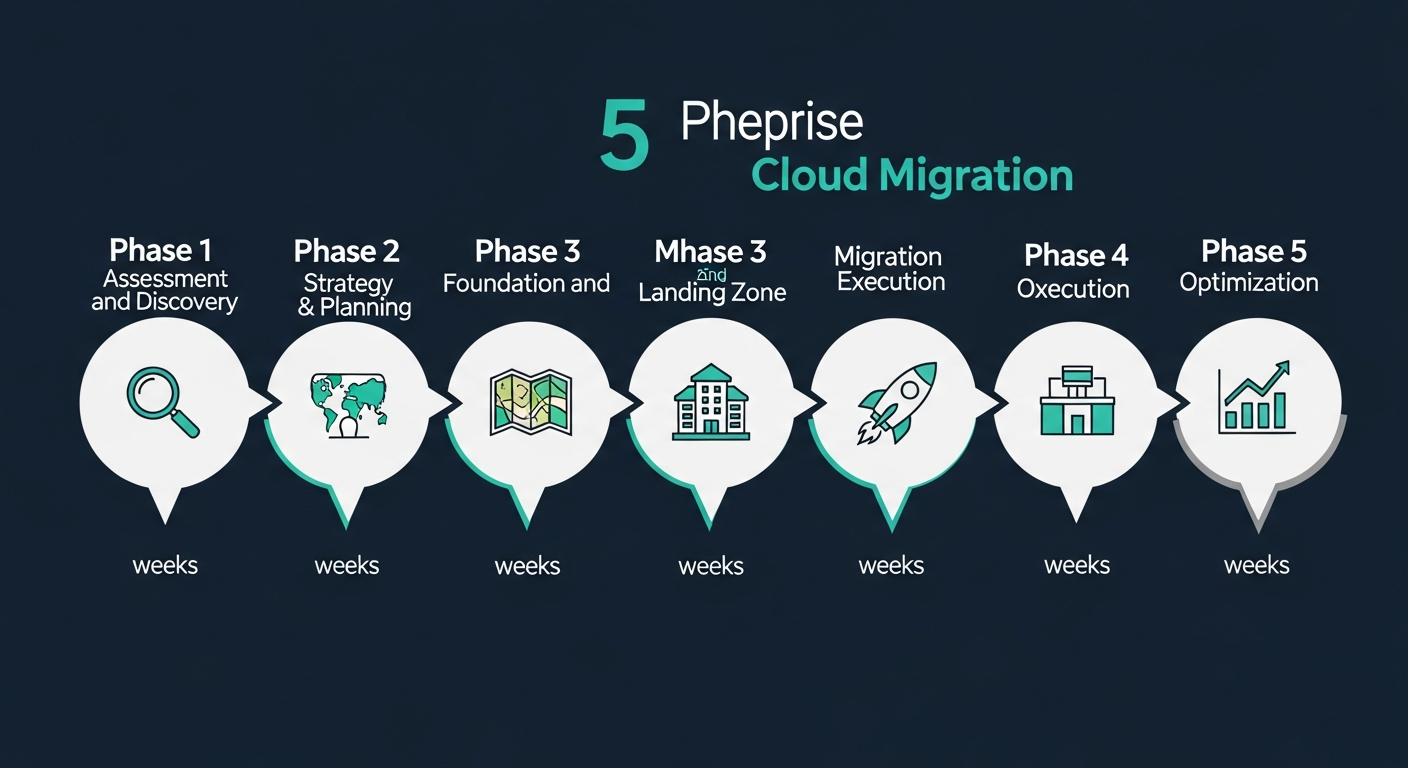
Successful cloud migrations follow a structured, phased approach. Here is the proven playbook used by enterprises that get it right:
Phase 1: Assessment and Discovery (Weeks 1–4)
This is the foundation of your entire migration. Cut corners here, and everything downstream suffers.
Key activities:
- Inventory all applications, databases, servers, and network dependencies
- Map application interdependencies — which systems talk to which, and how
- Assess data volumes, transfer requirements, and compliance constraints
- Benchmark current performance metrics (latency, throughput, availability) for post-migration comparison
- Identify technical debt, security vulnerabilities, and licensing implications
Deliverables: Complete application inventory, dependency map, migration readiness assessment, risk register
According to Forrester Research, organizations that invest adequately in the assessment phase experience 40% fewer migration issues and complete migrations 30% faster than those that rush to execution.
Phase 2: Strategy and Planning (Weeks 3–6)
Key activities:
- Assign a migration strategy (6 Rs) to each application based on assessment findings
- Define migration waves — groups of applications migrated together based on dependencies and risk
- Design the target cloud architecture (VPC layout, security groups, IAM policies, networking)
- Create a detailed migration timeline with milestones and rollback triggers
- Develop a communication plan for stakeholders at every level
- Build a cloud cost model with projected monthly and annual spend
Deliverables: Migration strategy document, wave plan, target architecture, cost model, project timeline
Phase 3: Foundation and Landing Zone (Weeks 4–8)
Before migrating any workloads, build a secure, well-architected cloud foundation:
- Landing Zone: Configure accounts, organizational units, networking (VPCs, subnets, peering), and core security controls
- Identity and Access Management: Set up IAM policies, SSO integration, role-based access control
- Network Connectivity: Establish VPN or Direct Connect/ExpressRoute between on-premises and cloud
- Monitoring and Logging: Deploy CloudWatch/Azure Monitor/Cloud Monitoring with alerts and dashboards
- Compliance Baseline: Implement guardrails for regulatory requirements (HIPAA, SOC 2, PCI DSS, GDPR)
Phase 4: Migration Execution (Weeks 6–24+)
Execute migrations in planned waves, starting with lower-risk applications to build team confidence:
Wave 1 — Quick Wins (Weeks 6–10):
- Migrate development and testing environments first
- Move standalone applications with minimal dependencies
- Validate monitoring, alerting, and backup procedures
Wave 2 — Core Business Applications (Weeks 10–18):
- Migrate production workloads with established patterns from Wave 1
- Execute database migrations with tested rollback procedures
- Implement blue-green or canary deployment strategies for zero-downtime cutover
Wave 3 — Complex and Critical Systems (Weeks 16–24+):
- Migrate mission-critical applications with comprehensive testing and validation
- Handle complex database migrations (multi-TB, multi-region, real-time replication)
- Execute final on-premises decommissioning
Phase 5: Optimization and Modernization (Ongoing)
Migration is not the finish line — it is the starting point for cloud value realization:
- Cost Optimization: Right-size instances, implement auto-scaling, leverage reserved instances and savings plans. Most organizations can reduce cloud spend by 30–40% through optimization.
- Performance Tuning: Optimize database queries, implement caching (ElastiCache, CloudFront), tune compute and memory allocation
- Modernization: Progressively refactor key applications to leverage cloud-native services (Lambda, ECS/EKS, managed databases)
- FinOps Practice: Establish continuous cloud cost management with visibility, accountability, and optimization processes
Cloud Migration Cost Breakdown: What Enterprises Should Budget in 2026
Cloud Migration Costs: What Enterprises Should Budget
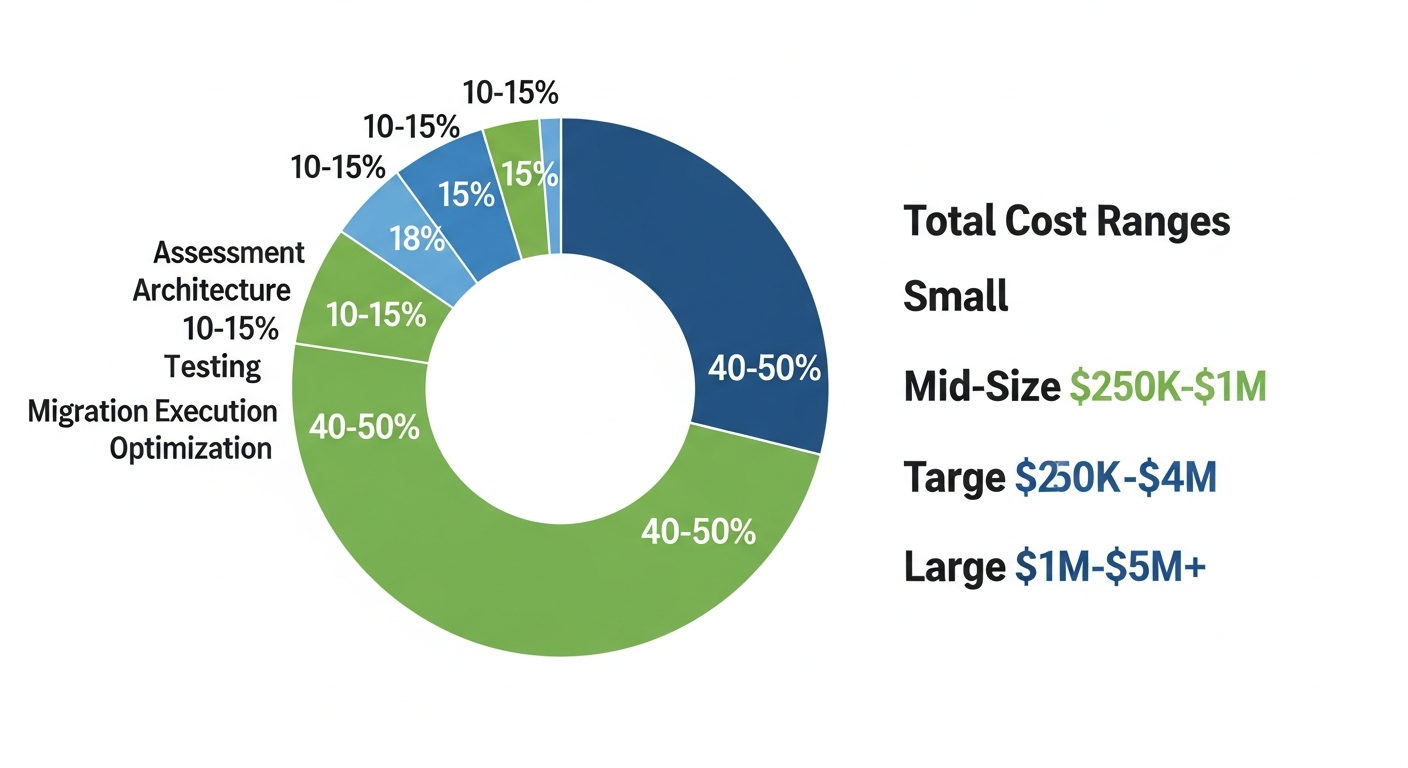
Cloud migration costs vary significantly based on scope, complexity, and strategy. Here are realistic 2026 cost ranges:
Migration Project Costs
- Small Enterprise (10–50 workloads): $50,000–$250,000
- Mid-Size Enterprise (50–200 workloads): $250,000–$1,000,000
- Large Enterprise (200–1000+ workloads): $1,000,000–$5,000,000+
Cost Breakdown by Component
- Assessment and Planning: 10–15% of total budget ($25,000–$200,000)
- Architecture and Landing Zone: 10–15% ($25,000–$150,000)
- Migration Execution: 40–50% ($100,000–$2,000,000+)
- Testing and Validation: 10–15% ($25,000–$200,000)
- Post-Migration Optimization: 10–15% ($25,000–$200,000)
Hidden Costs to Budget For
- Data Transfer Costs: Cloud providers charge for data egress. Moving 100TB+ can cost $5,000–$50,000+ in transfer fees alone
- Dual-Running Costs: You will run on-premises and cloud simultaneously during migration — budget 3–6 months of dual infrastructure costs
- Training and Upskilling: Cloud certifications, training programs, and learning curve costs: $2,000–$5,000 per team member
- Application Refactoring: Applications that need code changes for cloud compatibility can add $10,000–$100,000+ per application
- Licensing Changes: Some software licenses don’t transfer to cloud. Bring Your Own License (BYOL) vs. cloud-included licensing can significantly impact costs
For a detailed breakdown of AI and software development costs that often accompany cloud migration projects, see our guide on AI software development costs in 2026.
Cloud Security: Non-Negotiable Requirements
Security is the #1 concern CTOs cite when evaluating cloud migration. According to Cisco’s research, 76% of enterprises consider cloud security as a critical or very important factor in their migration decisions.
Essential Cloud Security Measures
- Zero Trust Architecture: Implement identity-based access controls that verify every request regardless of network location. Never trust, always verify.
- Encryption Everywhere: Data encrypted at rest (AES-256) and in transit (TLS 1.3). Manage encryption keys through cloud KMS or bring your own keys (BYOK).
- Network Segmentation: Use VPCs, security groups, and network ACLs to isolate workloads. Implement micro-segmentation for sensitive applications.
- Identity and Access Management: Enforce least-privilege access, multi-factor authentication, and regular access reviews. Use cloud-native IAM with SSO integration.
- Continuous Monitoring: Deploy SIEM solutions (Splunk, Sentinel, Chronicle) with real-time threat detection and automated incident response.
- Compliance Automation: Use tools like AWS Config, Azure Policy, or Google Cloud Security Command Center for continuous compliance monitoring.
Compliance Frameworks to Address
- SOC 2 Type II: Required for most B2B SaaS and enterprise applications
- HIPAA: Mandatory for healthcare data — requires BAAs with cloud providers
- PCI DSS: Required for payment card data processing
- GDPR: Data residency and processing requirements for EU data subjects
- ISO 27001: International standard for information security management
Common Cloud Migration Mistakes (And How to Avoid Them)
Based on analysis of hundreds of enterprise migrations, Harvard Business Review identifies these as the most costly mistakes organizations make:
1. Treating Migration as a Pure IT Project
Cloud migration is a business transformation. When IT leads without business alignment, the result is technically successful but strategically meaningless migrations that don’t deliver expected ROI. Involve business stakeholders from day one — they should help prioritize which applications matter most.
2. Lift-and-Shift Everything
Blindly rehosting every application wastes the opportunity to modernize and often results in higher cloud costs than on-premises. Use the 6 Rs framework to make intentional decisions about each application.
3. Underestimating Data Migration Complexity
Moving terabytes or petabytes of data is not trivial. Large datasets require careful planning around transfer methods (online vs. offline), data integrity validation, downtime windows, and synchronization strategies. According to Gartner, data migration issues are responsible for 38% of cloud migration delays.
4. Ignoring the People Side
Your infrastructure team needs cloud skills. Your developers need cloud-native development practices. Your finance team needs FinOps capabilities. Budget for training and organizational change management — not just technology.
5. No Exit Strategy
Vendor lock-in is real. Design your cloud architecture to be portable where practical. Use containers, infrastructure-as-code, and cloud-agnostic tools to maintain flexibility. Multi-cloud readiness does not mean multi-cloud deployment — it means keeping your options open.
6. Skipping the Optimization Phase
Many organizations complete migration and declare victory, only to face unexpectedly high cloud bills. Post-migration optimization is not optional — it is where 30–40% of the cost savings are realized.
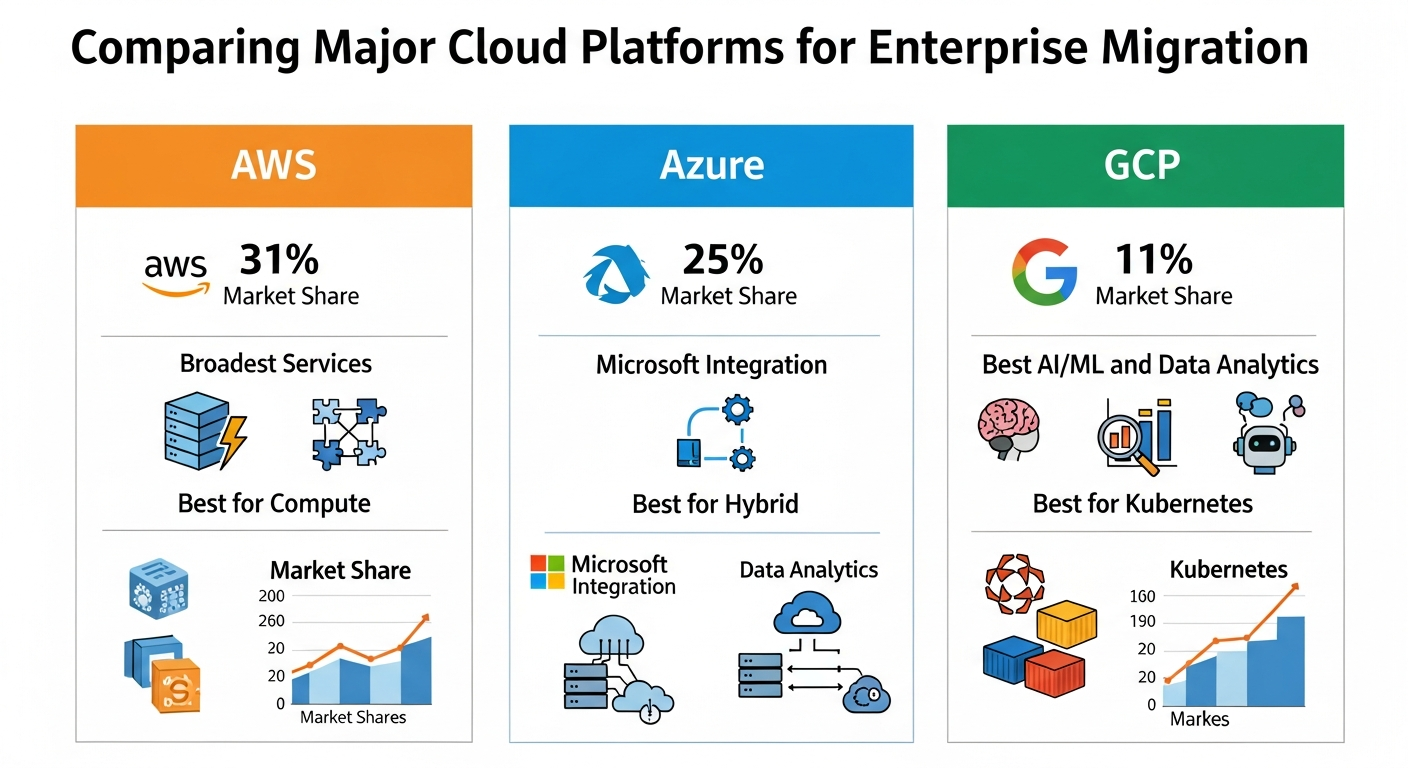
Choosing the Right Cloud Platform
The three major cloud providers each have distinct strengths:
Amazon Web Services (AWS)
- Market share: 31% (largest cloud provider)
- Strengths: Broadest service catalog (200+ services), most mature ecosystem, strongest in compute and storage
- Best for: Enterprises wanting maximum service breadth, startups needing rapid scaling, organizations with Linux-heavy workloads
Microsoft Azure
- Market share: 25%
- Strengths: Best integration with Microsoft ecosystem (Active Directory, Office 365, SQL Server), hybrid cloud capabilities with Azure Arc
- Best for: Microsoft-centric enterprises, organizations needing strong hybrid cloud, those with significant Windows Server and SQL Server workloads
Google Cloud Platform (GCP)
- Market share: 11%
- Strengths: Leading in AI/ML services (Vertex AI, BigQuery), best data analytics platform, strongest Kubernetes offering (GKE)
- Best for: Data-intensive organizations, AI/ML-heavy workloads, organizations standardized on Kubernetes
For enterprises leveraging AI software development services, cloud platform choice significantly impacts AI workload performance and cost. GCP leads in AI-native services, while AWS and Azure offer broader enterprise integration capabilities.
Real-World Cloud Migration Case Studies
Here are representative examples of successful enterprise cloud migrations:
Case Study 1: Financial Services — Core Banking Platform
- Challenge: A mid-sized bank needed to migrate 150+ applications from aging data centers, including core banking and trading platforms with zero-tolerance for downtime
- Strategy: Phased migration over 18 months — rehosted 60% of applications, replatformed 25%, refactored 10%, retired 5%
- Cloud: AWS with multi-region architecture for disaster recovery
- Investment: $2.8 million
- Result: 35% infrastructure cost reduction, 99.99% availability (up from 99.9%), 4x faster deployment cycles, full SOC 2 and PCI DSS compliance
Case Study 2: Healthcare — EHR and Clinical Systems
- Challenge: A regional hospital network needed to move electronic health records and clinical applications to cloud while maintaining HIPAA compliance
- Strategy: Replatformed to managed services on Azure with Azure Arc for hybrid connectivity to on-premises medical devices
- Cloud: Microsoft Azure with HIPAA BAA
- Investment: $1.2 million
- Result: 45% reduction in IT operational costs, improved disaster recovery (RTO from 24 hours to 2 hours), seamless EHR access across 12 facilities
Case Study 3: E-Commerce — Peak Traffic Scaling
- Challenge: An online retailer’s on-premises infrastructure couldn’t handle Black Friday traffic spikes, causing outages during the highest-revenue period
- Strategy: Refactored monolithic application into microservices on Kubernetes, implemented auto-scaling and CDN
- Cloud: Google Cloud with GKE and Cloud CDN
- Investment: $450,000
- Result: Zero downtime during peak traffic (10x normal load), 50% reduction in infrastructure costs during off-peak, 2-second average page load (down from 8 seconds)
How to Choose a Cloud Migration Partner
Selecting the right migration partner is critical to success. Use this evaluation framework:
Must-Have Capabilities
- Cloud certifications: AWS Advanced Partner, Azure Expert MSP, or Google Cloud Partner — verify, don’t take their word for it
- Migration methodology: A proven, documented migration framework — not a “we’ll figure it out” approach
- Industry experience: Demonstrated success migrating similar workloads in your industry
- Security expertise: Deep knowledge of cloud security, compliance frameworks, and data protection
- Automation tooling: Use of infrastructure-as-code (Terraform, CloudFormation), CI/CD pipelines, and migration automation tools
Evaluation Criteria
- Track record (40% weight): Verifiable case studies, client references, number of successful migrations completed
- Technical depth (25% weight): Named team members with relevant certifications and hands-on experience
- Methodology and tooling (20% weight): Documented approach, risk management, automated migration and testing tools
- Commercial terms (15% weight): Transparent pricing, milestone-based payments, clear SLAs, knowledge transfer commitments
An experienced custom software development partner with enterprise migration expertise can dramatically reduce risk and accelerate time-to-value.
AWS vs Azure vs Google Cloud: Choosing the Right Platform for Your Enterprise Migration
Conclusion: Migrate Smart, Not Just Fast
Cloud migration is simultaneously one of the highest-value and highest-risk technology initiatives an enterprise can undertake. The organizations that succeed are not the ones that move fastest — they are the ones that move smartest.
The playbook is clear: invest adequately in assessment and planning, use the 6 Rs framework to make intentional decisions about each application, build a secure cloud foundation before migrating workloads, execute in phased waves with rollback capability, and treat optimization as an ongoing discipline rather than a one-time activity.
In 2026, the question is no longer whether to migrate to the cloud — it is how to do it in a way that maximizes business value while minimizing risk and cost. The framework in this guide, combined with the right migration partner, gives you the roadmap to get there.
About DreamzTech: We are a leading enterprise software development company specializing in cloud migration, custom software development, and AI-powered solutions. Our team helps enterprises worldwide navigate complex technology transformations with confidence and measurable results.
Ready to discuss your cloud migration? Contact us today for a free, no-obligation cloud migration assessment.