HOA Capital Project and Large Loss Management Software Case Study

HOA Capital Project and Large Loss Management Software Case Study

Case Study | Real Estate Technology

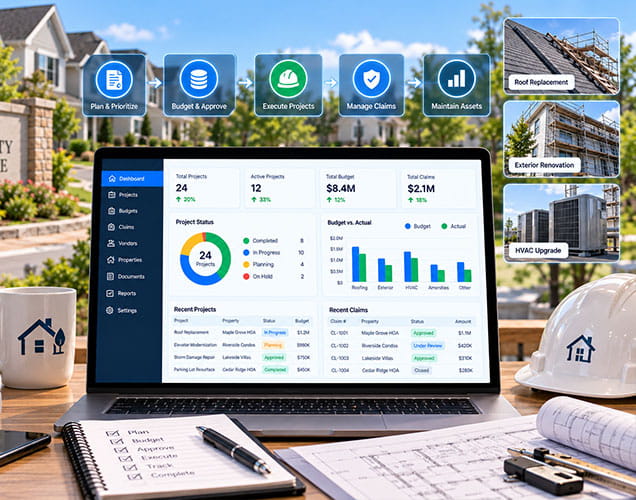
DreamzTech built a custom community association management software platform for a US-based community association management company. The role-based solution connects lead qualification, community records, vendors, RFPs, bids, capital projects, Board approvals, construction progress and large-loss workflows in one system.

  • Industry HOA and Community Association Management
  • Solution Custom PropTech Workflow Platform
  • Delivery End-to-End Product Engineering

Explore Real Estate Software Development →

Discuss Your HOA Software Project
HOA Capital Project and Large Loss Management Software Case Study
Trusted By Startups, SMBs to Fortune 500 Brands

Quick Answers

Overview

Community association teams often manage high-stakes work across disconnected email threads, spreadsheets, documents and vendor portals. A lead may begin on a website, become an opportunity, require an RFP and Board approval, then progress into a construction project with schedules, payment documentation and closeout records. A severe weather or property event adds another layer of inspections, insurance information, mitigation, contractors and settlement activity.

DreamzTech designed a custom PropTech platform to bring these workflows together. The system creates a connected path from lead intake to project execution while giving internal employees and external vendors access to the information and actions appropriate to their roles. This case study is anonymized to protect the client's identity.

Challenges

How the Platform Works

Three connected workflows carry a record from first contact through project or loss closeout.

Lead to Opportunity

Capital Project and RFP Workflow

Large-Loss Workflow

The Solution DreamzTech Delivered

DreamzTech delivered a modular community association workflow platform that turns scattered operational tasks into connected, role-aware processes. The solution supports the following capability areas:

Lead and CRM

Website leads enter a searchable lead list. When an email matches an existing community association, the system can connect the records; when no association exists, authorized users can create one before converting the lead.

Qualified leads become opportunities with structured stage, range-of-magnitude estimate, probability, estimated revenue, target dates, next steps, type, description, tags and associated contacts.

Association information provides a common reference for community contacts, managers, location, market context and the operational work that follows.

Vendor and RFP

Internal teams maintain vendor identity, contact information, status, contract details, markets, submarkets, service categories, notes, documents and configurable fields.

Vendors sign in to a restricted workspace and see only assigned records. They can review RFPs, enter bid information, respond to RFIs, add remarks and submit relevant files.

Teams can coordinate scope and specification development, internal or Board review, vendor selection, RFP distribution, RFI handling, bid receipt and comparison before award.

Capital Projects

Awarded work progresses through contract finalization, pre-construction, production planning, schedule and SOV management, progress updates, payment documentation and closeout.

Structured review points keep selection, authorization, invoice and payment decisions tied to the appropriate community and project record.

Invoices, pay applications, contractor invoices and lien waivers can be validated and organized alongside progress and approval records.

Punch-list validation, warranty delivery and final invoice approval form a defined closeout path rather than an informal handoff.

Large Loss

Teams record the peril, affected community, key dates, association and management contacts, operating region, preliminary scope and relevant parties.

Properties can be inspected, assigned a damage rating and supported with reports, photos and inspection dates in the loss record.

Authorized users can organize policy information, carrier, deductible, claim status, coverage milestones, dispute information and settlement details.

The workflow supports Board authorization, urgent mitigation records, contractor assignment, supporting documents and later build-back or capital work.

Teams can record contractor payments and settlement-related information against the loss record for clearer financial traceability.

Access and Reporting

Administrators configure internal and vendor users, roles, market and submarket access, timezone, reporting manager, profile information and signatures.

Search, filters, tags, stages, geographic attributes and linked records help teams find work and understand status across a multi-community portfolio.

Success and Outcomes

The reviewed materials do not provide approved before-and-after percentages. The following outcomes are framed as verified operational capabilities, not fabricated performance claims.

Connected Lead-to-Project Record

Teams can preserve context as an inquiry becomes an association, opportunity, RFP, project or loss workflow.

Structured Vendor Participation

Vendor qualifications, territories, services, bids, questions and files remain connected to authorized work.

Clearer Board Decision Trail

Approval and selection steps can be recorded with the project rather than dispersed across messages and spreadsheets.

More Complete Construction Record

Schedule, SOV, progress, invoices, pay documentation, lien waivers, punch lists and warranties can be managed together.

Coordinated Large-Loss Response

Peril, inspection, insurance, mitigation, contractor, settlement and payment information can be viewed in one operational context.

Role-Based Accountability

Employees, managers and vendors receive access aligned to their responsibilities and assigned records.

Portfolio-Level Visibility

Search, filters, stages, markets and linked entities make multi-community work easier to organize and review.

Reusable Operating Model

Configured workflows create a repeatable foundation for future integrations, reporting and approved automation.

Optional Future AI Opportunities

No delivered AI capability was verified in the reviewed material. If DreamzTech and the client later confirm implementation, the existing workflow foundation could support governed AI features, described here as roadmap ideas only — not part of the delivered solution:

Conclusion

DreamzTech delivered a custom community association management software platform for operational work that generic property management tools often handle only in fragments. By connecting leads, associations, vendors, RFPs, Board decisions, capital projects and large-loss records, the solution creates a more consistent foundation for governed collaboration and portfolio visibility. Planning a custom HOA management platform, vendor portal, capital project workflow or large-loss solution? DreamzTech can design an architecture around your operating model, roles, integrations and reporting requirements through its custom software development practice. Contact DreamzTech to discuss your project.

Leading Global Software Company

Trusted by Industry Leaders Worldwide

Trusted by startups to Fortune 500s, including DHL, Nestle, and Stanford - partners who rely on us for high-impact, scalable software solutions.

Book a Discovery Call

    I Consent to Receive SMS Notifications, Alerts from DreamzTech US INC. Message frequency may vary. Message & data rates may apply. Text HELP for assistance. You may reply STOP to unsubscribe at any time.
    I Consent to Receive the Occasional Marketing Messages from DreamzTech US INC. You can Reply STOP to unsubscribe at any time.
    By submitting the form, you agree to the DreamzTech Terms and Policies

    Frequently Asked Questions (FAQ)

    Community association management software helps association management companies organize communities, contacts, Boards, vendors, tasks, documents and governed workflows. A custom platform can also support specialized operations such as RFPs, capital projects and large-loss events.

    DreamzTech built a role-based workflow platform that connects website leads, association records, opportunities, vendor administration, vendor portal access, RFPs, bids, construction workflows and large-loss records for a US-based community association management company.

    Many HOA products focus on accounting, resident communication, violations and maintenance requests. This custom solution emphasizes lead-to-project continuity, vendor bidding, Board-governed capital work, construction documentation and large-loss coordination.

    A website lead enters the lead list, where the system can connect it to an existing association or allow an authorized user to create a new association. The lead can then be qualified and converted into an opportunity with stage, ROM, probability, dates and next steps.

    Internal teams maintain vendor profiles, contract status, markets, submarkets, services, notes and documents. Assigned vendors use a restricted portal to review relevant RFPs, submit bid information, respond to RFIs and upload project files.

    Yes. The documented workflow covers scope and specification preparation, approval, qualified-vendor selection, RFP distribution, RFIs, bid submission, bid comparison, contractor selection and contract progression.

    It creates a structured path from RFP and award through pre-construction, schedule and SOV tracking, progress updates, invoices, pay applications, lien waivers, Board approvals, punch lists, warranties and final closeout.

    A schedule of values, often shortened to SOV, divides the contract amount across work components or milestones. It helps project teams review progress and payment requests against the agreed project breakdown.

    A large-loss workflow can organize the peril, affected communities, inspections, damage ratings, photos, insurance details, Board authorization, mitigation, contractors, claim milestones, settlement information and payments in a connected record.

    Yes. Administrators can configure employee and vendor users, assign roles, connect reporting managers, scope users by market or submarket and limit vendors to assigned records.

    Yes. The vendor walkthrough shows a restricted portal where vendors access relevant assignments and RFPs, enter bid details, answer RFIs and upload supporting information without general internal access.

    A custom implementation can integrate with approved third-party platforms through available APIs and secure data exchanges. Specific integrations, fields, ownership and exception handling should be confirmed during discovery.

    The reviewed project materials verify workflow software, not a deployed AI model. The architecture can be extended with governed AI for document extraction, bid comparison, vendor matching, risk signals and knowledge retrieval after requirements, data controls and human-review rules are approved.

    Evaluate workflow fit, role and data security, Board approval controls, vendor access, document traceability, reporting, integration options, mobile usability, configurability and the vendor’s ability to support complex portfolio operations.

    Yes. A phased architecture can connect selected workflows and existing systems first, then expand by priority. Discovery should define the source of truth, integration boundaries, user roles, migration needs and measurable success criteria.