














AI-Assisted Construction Takeoffs for Electrical Teams

Electrical Takeoff Software for Faster Bids

Turn your electrical drawings into reviewed, bid-ready device counts and measured runs—without giving up estimator control. Bring your own plan set to a guided demo and see exactly how the workflow fits your symbols, scope and estimating process.

Run the workflow on your own electrical sheets, not a prepared sample Estimator review of every detected device and measured run Quantities structured for handoff into your estimating process Honest fit assessment: product evaluation, custom build, or neither
Trusted by Startups, SMBs and Fortune 500 Enterprises
How It Works

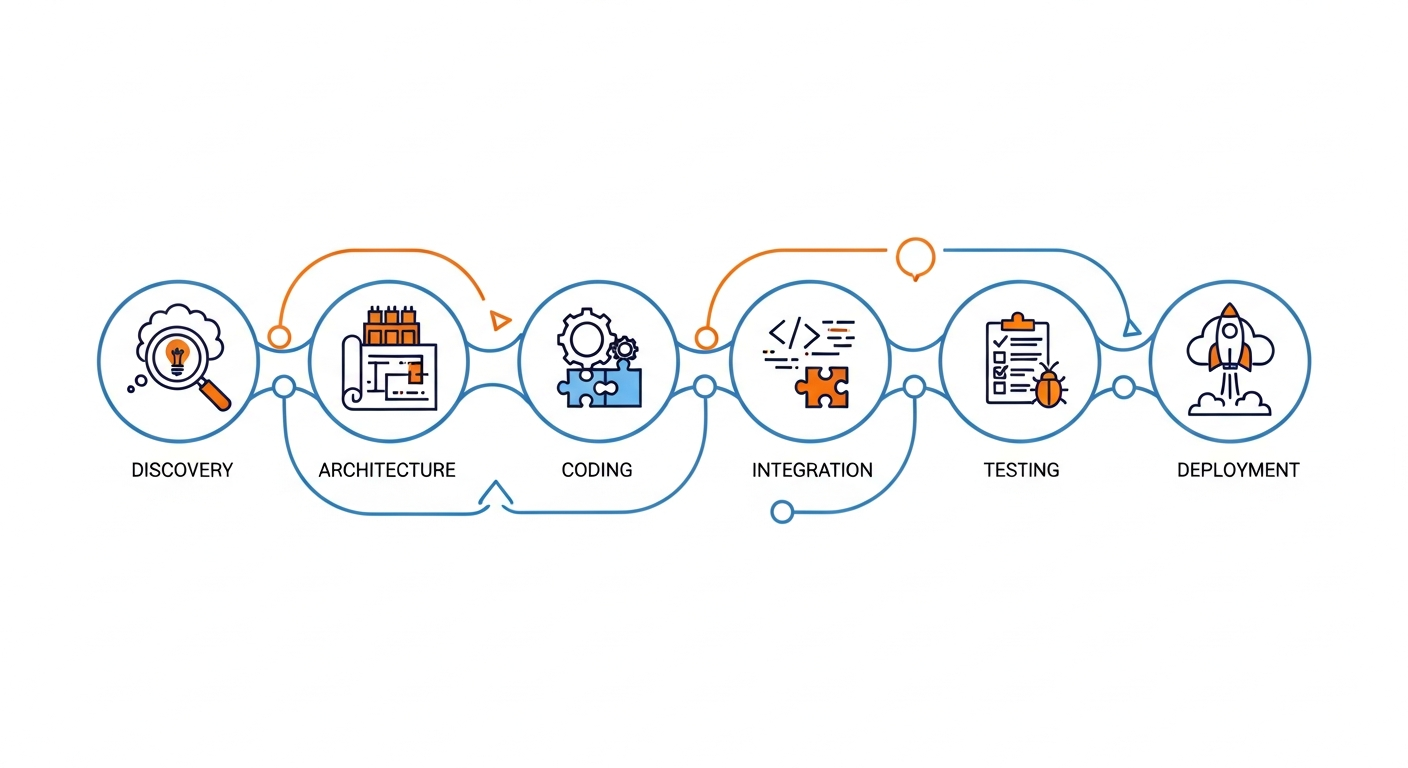
How the Electrical Takeoff Workflow Works

Five stages from an electrical plan set to quantities an estimator has signed off. Which file types, device classes and outputs apply to your projects is established against your own drawings in the demo — one click does not produce a priced bid, and no stage here claims to.

Capabilities

Electrical Takeoff Tools Built Around the Estimator's Workflow

The six things that decide whether an electrical takeoff tool survives a bid week. We demonstrate each on your own sheets rather than listing them as specifications — a feature that works on a clean sample drawing and one that works on a reissued low-voltage sheet are not the same feature.

Legend Mapping and Symbol Handling

Your device legend is the reference the whole takeoff depends on. Detection is mapped onto the symbols your design office actually draws, and custom or non-standard callouts are exactly the case to put in front of a demo — they are where generic tools lose counts quietly.

Device and Fixture Counts

Receptacles, switches, lighting fixtures, junction boxes and similar repeated items counted per class rather than as one total, so a symbol that appears rarely cannot hide inside a headline number.

Plan Scale and Calibration

Every measured length depends on scale being right for that sheet. A wrong scale does not produce an obvious error — it produces confident, plausible, wrong footage. Scale is established and verified per sheet before measurement.

Line and Length Measurement

Conduit, cable tray and homerun runs measured along the drawing. Worth understanding clearly: a plan-view distance is a 2D measurement, not an installed cable length with drops, slack and routing allowances.

Editable Items, Notes and Review Controls

Accept, adjust or reject each item, with notes against the drawing and confidence shown rather than hidden. How quickly an estimator can confirm or correct output is the measure that decides adoption.

Drawing Organization and Revision Handling

Sheets organized by project with reissued drawings kept distinct. Addenda are routine in electrical bidding, and a takeoff that cannot tell one revision from another creates rework instead of removing it.

Scope

What Can Be Included in an Electrical Quantity Takeoff?

Electrical symbols, schedules and plan notes vary between design offices and often between sheets on the same job, so support is confirmed per project rather than declared in advance. Every row below reads Confirm during demo for exactly that reason — we would rather show you than promise you.

Electrical elementTypical measurementProduct support statusEstimator verification
Receptacles, switches, devicesCount by device classConfirm during demoSpot-check counts per class against a sheet taken off by hand
Lighting fixturesCount by fixture typeConfirm during demoReconcile against the fixture schedule, not the plan view alone
Conduit and cable trayLinear measurementConfirm during demoCheck scale per sheet; 2D length is not installed length
Homeruns and circuit routingLinear measurement / countConfirm during demoConfirm routing assumptions before the figure reaches pricing
Panelboards and equipmentCount / schedule reconciliationConfirm during demoVerify against panel schedules and single-line drawings
Low-voltage, data, fire alarmCount by device classConfirm during demoConfirm the separate legend used on those sheets is read correctly
Boxes, fittings, supportsCount / derived quantityConfirm during demoEstablish whether these are drawn, scheduled or assumed by rule
Material pricing and labor unitsNot a takeoff outputNot in scopeBelongs to your estimating process — see the comparison below

Electrical Takeoff Software vs. Electrical Estimating Software

A takeoff is a measurement input. An estimate is a commercial output. Tools that do both exist; this one is a takeoff tool, and the column on the right is the honest scope line.

TaskElectrical takeoffFull electrical estimatingDreamzTech verified scope
Plan-based quantitiesCore functionIncluded as an inputDemonstrated on your drawings
Symbol and device countsCore functionUsually includedDemonstrated on your drawings
Length measurementCore functionUsually includedDemonstrated on your drawings
Materials pricingNot includedCore functionNot in scope
Labor unitsNot includedCore functionNot in scope
AssembliesNot includedCore functionNot in scope — discuss as custom development
Overhead and markupNot includedCore functionNot in scope
Bid proposal outputNot includedCore functionNot in scope
Revisions and approvalDrawing revision handlingBid revision controlConfirm during demo

If you need pricing, labor units and assemblies joined to the takeoff, that is an engineering scope rather than a product setting — see custom AI takeoff development.

Oversight

AI-Assisted Electrical Takeoffs With Estimator Review

Electrical drawings carry ambiguous symbols, mixed revision sets, project-specific legends and plenty of low-resolution scans. Any AI pass over them produces a reviewable first draft, not a finished takeoff — and a tool that pretends otherwise just moves the error somewhere harder to find.

Drawings

Work With Electrical Drawings, Legends and Plan Updates

Four things about electrical plan sets that decide how a takeoff goes. Each names what can reasonably be automated and what stays a manual project control — the distinction matters more on electrical work than on most trades.

Who It Is For

Who Can Use Electrical Takeoff Software?

Electrical takeoff rewards automation because the same symbols repeat across every sheet of every job. These are the four roles that get the most out of an evaluation.

Commercial Electrical Subcontractors

Problem: multi-sheet device counts on commercial jobs eat the bid window, and capacity is capped by how many estimators you can put on a plan set. Outcome: the repetitive marking shrinks, so the limit becomes review time rather than measuring time.

Residential and Service Electrical Firms

Problem: high bid volume on smaller jobs, where the time per takeoff matters more than the complexity of any one. Outcome: a faster repeatable pass over standard plan types, with the estimator confirming rather than marking from scratch.

MEP Estimators and Preconstruction Teams

Problem: electrical is one of several disciplines to quantify, each with its own legend and conventions. Outcome: consistent method and one audit trail across the trade instead of per-estimator spreadsheets nobody else can reconstruct. Bidding plumbing too? See plumbing takeoff software.

General Contractors Checking Electrical Scope

Problem: validating a subcontractor's electrical quantities without re-doing the entire takeoff by hand. Outcome: an independent count to compare against, with the derivation visible behind each number.

Client Validation

Why Evaluate DreamzTech for Electrical Takeoff?

What we can actually evidence: custom application engineering, computer vision work, integration delivery into enterprise systems, and a demo that runs on your own electrical sheets before anyone asks you to commit. If the product route does not fit your legends and revision process, we can build the workflow instead — and we will say which. No accuracy percentage, speed multiple or competitor comparison appears on this page, because none has a published methodology behind it.

Clutch Reviews

How Electrical Takeoff Results Become Defensible

Review the method, worked example and standards behind a reliable electrical quantity takeoff. See how estimator checks turn device counts and measured runs into evidence your team can trust before bid submission.

On-page proof

Electrical Takeoff Case Studies

Three representative electrical projects show the quantities reviewed, the drawing risks checked and the evidence retained before bid preparation.

Case Study 01Representative project evidence

18,400 sq ft Office Fit-Out

Takeoff scope: Lighting, receptacles, switches, junction boxes and measured conduit or cable-tray runs.

Estimator evidence: Estimator review reconciles legend classes, flags missed symbols and records every count or length correction.


Case Study 02Representative project evidence

Multifamily Power & Lighting Plans

Takeoff scope: Unit devices, common-area lighting, panels and feeders across repeated floor plans.

Estimator evidence: Typical-unit logic is checked floor by floor, while panel and equipment schedules prevent omitted scope.

Case Study 03Representative project evidence

Warehouse & Low-Voltage Scope

Takeoff scope: High-bay fixtures, devices, tray or conduit routes, fire-alarm and data symbols.

Estimator evidence: System-specific legends and revision checks separate similar symbols and prevent duplicated quantities.

DreamzTech electrical takeoff capabilities

Electrical Takeoff Features DreamzTech Delivers

DreamzTech delivers AI-assisted electrical takeoff capabilities for contractors who need faster device counts and measured runs without losing estimator control. The workflow connects legends, plans, schedules, review decisions and structured output in one traceable process.

Legend and symbol mapping

Project-specific device legends are mapped before detection so receptacles, switches, fixtures and low-voltage symbols are classified in context.

Device and fixture counts

The workflow locates electrical devices and lighting classes across multi-sheet plan sets while retaining every detected position for review.

Scale-verified measured runs

Conduit, cable tray and other plan runs can be measured after per-sheet scale calibration, with assumptions visible to the estimator.

Panel and schedule reconciliation

Panelboards, equipment and fixture schedules are checked against plan detections to surface missing or conflicting scope.

Estimator correction and approval

Low-confidence items, false positives, missed symbols and quantity corrections are reviewed before any result moves into estimating.

Electrical quantity handoff

Approved counts and lengths are organized by class, sheet and revision for spreadsheet, assembly mapping or scoped system integration.

AI Case Studies

See an Electrical Takeoff on a Real Drawing

We run the demo on your drawing, not a recorded one. A prepared sample sheet with a tidy legend proves nothing about your reissued low-voltage plans — so bring a job you have already taken off by hand and we will work through it live with your estimators in the room.

Build or Buy

Ready-to-Use Electrical Takeoff or Custom AI Development?

Two routes, genuinely different commitments. The demo is how you find out which one your drawings and estimating process point to — and either answer is a fine result.

NeedProduct evaluation
this page
Custom AI development
Common takeoff workflowEvaluate the product against your plan setsUnnecessary — if the product fits, use it
Proprietary symbol setsConfirm coverage of your legend in the demoTrained on your own device callouts and legend conventions
Enterprise integrationsExport and interfaces confirmed during evaluationEngineered to your target systems, bounded by their APIs
Fully bespoke estimation processOut of scope — this is a takeoff toolPricing, labor units and assemblies built into the workflow
Source-code / IP ownershipLicensed use under the product agreementDefined in the project agreement, subject to third-party component terms
Time to first valueShorter — evaluate, then adopt if it fitsLonger — discovery and build before first use

Licensing a product is not the same as owning it. Source-code and model ownership terms belong to a development agreement, not a software licence — if owning the capability matters, that points to custom AI takeoff development. For the cross-trade workflow, see AI takeoff software for construction.

Frequently Asked Questions

Electrical Takeoff Software FAQs

What electrical estimators ask when evaluating takeoff software: what it counts, how conduit lengths differ from installed cable, whether it produces a bid, how custom legends are handled, how accuracy is checked, and what to put in front of a demo.

Software that extracts quantities from electrical drawings — counts of devices and fixtures, measured lengths of runs, and the material items a job needs.

It is not the same as electrical estimating software, which adds material pricing, labor units, overhead and markup to turn those quantities into a bid. Takeoff is the measurement input; estimating is the commercial output. Treat a takeoff tool as something that removes repetitive marking from an estimator’s day, not something that produces a priced proposal.

Computer vision locates repeated symbols across the sheets, then an estimator reviews what it found.

As a class of capability, detection models are trained to recognize shapes on a drawing and return each one with a location and a confidence value. On electrical work the legend matters enormously, because device callouts differ between design offices. What this particular workflow detects on your sheets is established in a demo rather than claimed here — and anything it is unsure about should be surfaced for checking rather than folded silently into a total.

Those are exactly the items to test in a demo, and we do not claim coverage in advance.

Receptacles, switches and lighting fixtures are the highest-volume symbols on most electrical plans, which is why they are where automation pays off and also where a generic symbol library most often fails. Coverage depends on how your drawings represent them and whether your legend uses custom callouts. Bring a sheet you have already counted by hand and we will compare per device class.

It can measure distances on the drawing. That is not the same as installed cable length.

A 2D plan-view measurement follows the route as drawn. Installed quantities add vertical drops, slack at terminations, routing deviations around obstructions and whatever allowance your estimating standards apply. Any tool that reports a plan length as a cable quantity is skipping a judgment that belongs to your process. Expect measured lengths as an input and apply your own installation assumptions on top.

No.

A takeoff produces quantities. A bid needs material pricing, labor units, assemblies, overhead, margin and risk applied to those quantities, plus the commercial judgment that decides what to include and exclude. Some products combine takeoff and estimating; this is a takeoff workflow, and its output is designed to hand off into whichever estimating system you already price in. Joining the two is an engineering scope — see custom AI takeoff development.

This is the single most important thing to test, and the honest answer depends on your legend.

Electrical symbol conventions vary by design office and sometimes by project within the same office. A detector tuned to one firm’s callouts will underperform on another’s. Where a product cannot be configured far enough for your symbol set, training on your own annotated drawings is a custom development scope rather than a product setting. Put your most unusual legend in front of the demo — not your cleanest one.

Against a plan set you have already taken off manually, compared per item class.

We do not publish an accuracy percentage, because a figure without the drawings and the test method behind it is marketing rather than evidence. The meaningful check is: counts compared per device class so a rarely-used symbol cannot hide in an aggregate; measured lengths compared against known quantities with scale verified per sheet; and missed items looked for deliberately, since an undetected item appears nowhere to be questioned.

PDF is the normal input for this category; the useful question is what it does with your PDFs.

A vector export carries structure that makes detection considerably more reliable. A scanned or photographed sheet does not, and scan quality caps achievable results regardless of software. Revision handling matters just as much on electrical work, because addenda routinely invalidate completed takeoff. Supported formats and revision behaviour are confirmed against your own sheets during evaluation rather than listed here.

Structured export is the normal handoff route; specific connectors are confirmed before they are committed to scope.

We deliberately do not publish a list of prebuilt integrations with named estimating or ERP platforms. What a given system can accept depends on the interface it genuinely exposes, which is assessed during evaluation. Where a route needs building rather than configuring, that is custom development and is quoted separately. The part that usually takes longest is mapping detected items onto your own cost codes and assemblies.

Put your hardest drawings in front of it, not your cleanest.

Worth checking: whether your device legend and any custom callouts are read correctly; counts per device class against a sheet you already took off by hand; how conduit and homerun lengths are measured and what assumptions apply; whether low-voltage sheets with their own legend are handled; how a reissued drawing is compared against the previous revision; how long correction actually takes an estimator; and what the output looks like arriving in your estimating process.

Request a Demo

Request a Demo for Your Electrical Takeoff Workflow

Show us the electrical drawing types and quantity outputs you work with. We'll help determine whether the current software or a tailored implementation fits your workflow.

What to bring to the demo

Evaluation and data handling

Awards & Recognition

Ratings

Book an electrical takeoff demo

Send your electrical sheets, legend and the quantities you need. We will run the workflow on them in the session and give you a straight answer on fit — product, custom build, or neither.

    By submitting the form, you agree to the DreamzTech Terms and Policies
    Count. Review. Hand off.

    See an Electrical Takeoff Run on Your Own Drawings

    Bring a plan set you have already taken off by hand, with its legend and a reissued sheet. We will show you where AI-assisted electrical takeoff helps and where it does not. No prepared sample sheets.