AI-Assisted Plumbing Plan Takeoffs

Plumbing Takeoff Software for Faster Bids

Turn your plumbing drawings into reviewed, bid-ready fixture counts and measured pipe runs—without giving up estimator control. Bring your own plan set to a guided demo and see exactly how the workflow fits your systems, schedules and estimating process.

Run the workflow on your own plumbing sheets, not a prepared sample Estimator review of every measured run and counted fixture Quantities structured for handoff into your estimating process Honest fit assessment: product evaluation, custom build, or neither
Trusted by Startups, SMBs and Fortune 500 Enterprises
How It Works

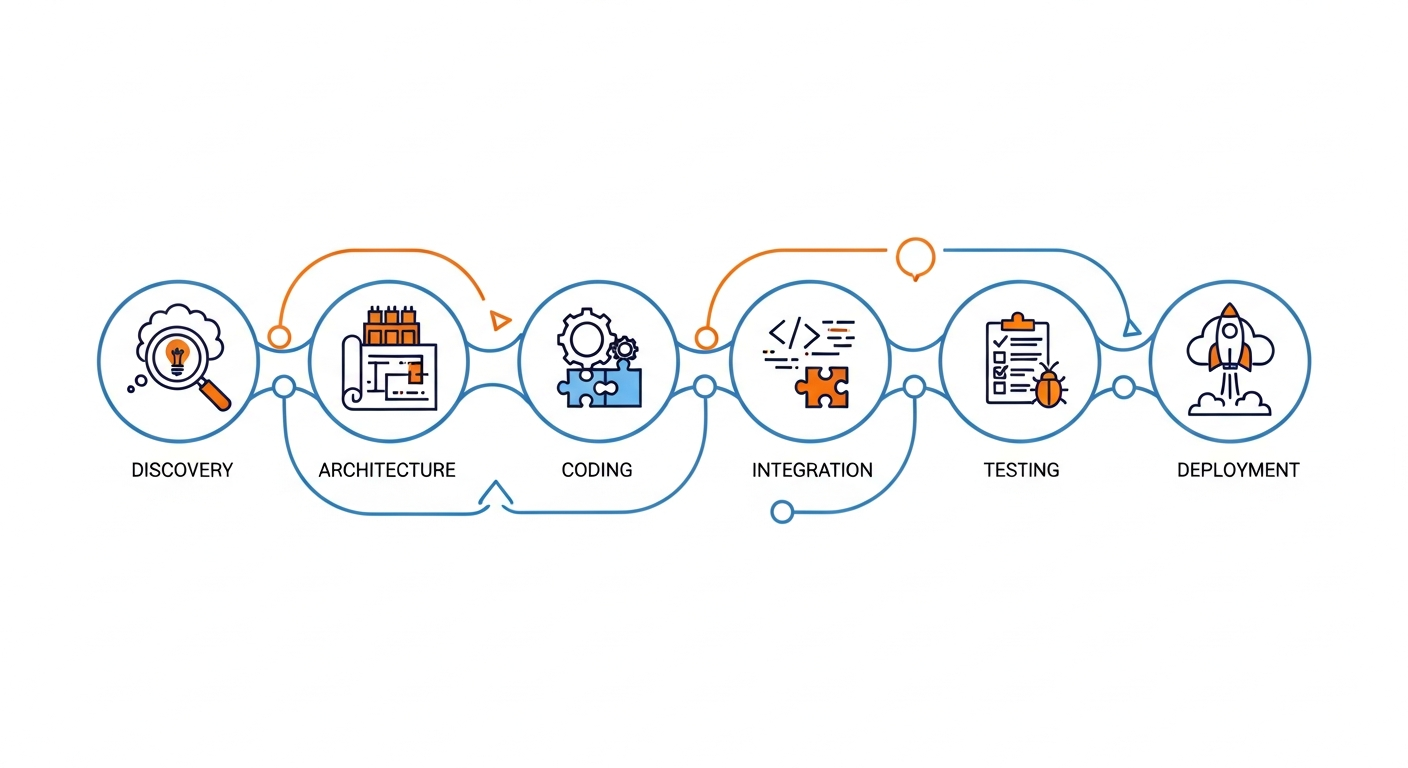
How Our Plumbing Takeoff Software Works

Five stages from a plumbing plan set to quantities an estimator has signed off. Which file types, measurement categories and outputs apply to your projects is established on your own drawings during the demo. A quantity takeoff is not automatically a priced bid — no stage here claims to produce one.

Capabilities

Key Plumbing Takeoff Software Features

Six capabilities that decide whether a plumbing takeoff tool survives a bid week. Each says what it does, what the estimator receives and where review is still needed — and each is demonstrated on your own sheets rather than asserted here.

Plan Measurement and Scale Calibration

Does: establishes and verifies plan scale per sheet, then measures distances against it. You receive: lengths with the sheet and scale recorded behind them. Review needed: confirming the scale is correct — every measurement inherits it.

Fixture and Equipment Counting

Does: counts repeated fixtures and equipment across the sheet set. You receive: counts grouped by type rather than a single total. Review needed: checking per fixture type, since a rarely-used symbol can be missed without moving an overall figure.

Pipe Run Quantities

Does: pipe takeoff along the drawing, grouped by the categories you set up. You receive: linear quantities by size or system. Review needed: a plan-view length is a 2D measurement, not installed pipe with drops, offsets and routing allowances.

Material Quantity Organization

Does: groups counts and lengths into the categories your team buys and prices against. You receive: a structured quantity summary rather than loose numbers. Review needed: confirming the grouping matches your estimating structure.

Review and Corrections

Does: presents every quantity for accept, adjust or reject, with uncertain items first. You receive: a reviewed set with corrections recorded. Review needed: this step is the review — it is deliberately not automated.

Revision Awareness

Does: keeps reissued sheets distinct so a superseded drawing is not mixed with a current one. You receive: takeoff tied to a known revision. Review needed: judging whether a change alters scope or only presentation.

Quantities

Measure Pipe Runs, Fixtures, and Plumbing Material Quantities

What a plumbing quantity takeoff normally has to cover, and the measurement each item takes. Symbol labels and schedule conventions vary between plan sets, so support is confirmed per project rather than declared in advance — every row reads Confirm during demo for that reason.

Plumbing scope itemTypical measurementProduct support statusEstimator verification
Water closets, lavatories, sinksCount by fixture typeConfirm during demoReconcile against the fixture schedule, not the plan view alone
Floor drains, cleanouts, hose bibbsCount by typeConfirm during demoCheck enlarged plans where symbols overlap the base sheet
Water heaters, pumps, equipmentCount / schedule reconciliationConfirm during demoVerify against equipment schedules and specifications
Supply and waste pipe runsLinear measurement by sizeConfirm during demo2D plan length is not installed pipe — add drops, offsets and routing
Risers and vertical runsInterpretation from riser diagramConfirm during demoPlan view does not show vertical scope; reconcile with the riser
Valves and specialtiesCount by typeConfirm during demoConfirm whether these are drawn, scheduled or assumed by rule
FittingsDerived quantityConfirm during demoOften estimated by rule against run length rather than counted
Insulation and hangersDerived from run lengthConfirm during demoDepends on your own estimating standards, not the drawing
Material unit prices and labor hoursNot a takeoff outputNot in scopeBelongs to your estimating process — see the comparison below

Illustrative example — the categories above show the shape of a plumbing quantity set, not output from a processed project. Real numbers come from running the workflow on your own drawings.

Move Plumbing Takeoff Quantities Into Estimating Workflows

A takeoff is a measurement input. An estimate is a commercial output. The right-hand column is the honest scope line for this workflow.

TaskPlumbing takeoffFull plumbing estimatingDreamzTech verified scope
Plan-based quantitiesCore functionIncluded as an inputDemonstrated on your drawings
Fixture and equipment countsCore functionUsually includedDemonstrated on your drawings
Pipe run lengthsCore functionUsually includedDemonstrated on your drawings
Material unit pricesNot includedCore functionNot in scope
Labor hours and productivityNot includedCore functionNot in scope
AssembliesNot includedCore functionNot in scope — discuss as custom development
Subcontractor pricingNot includedCore functionNot in scope
Overhead, tax and markupNot includedCore functionNot in scope
Final bid proposalNot includedCore functionNot in scope

We do not publish integrations with named estimating, ERP or accounting platforms. What a given system can accept depends on the interface it genuinely exposes, which is assessed during evaluation; where a route needs building rather than configuring, that is custom AI takeoff development.

Drawings

Plumbing Drawings, Plan Scale, and Review Considerations

Four things about plumbing plan sets that decide how a takeoff goes. Each names what can reasonably be automated and what stays a manual project control — being straight about this is more useful than a longer feature list.

Oversight

Keep Estimators in Control of Every Plumbing Takeoff

Any AI-assisted pass over plumbing drawings produces a reviewable first draft, not a finished takeoff. Plumbing is particularly unforgiving here, because so much scope lives in schedules, risers and spec notes rather than in countable symbols.

Who It Is For

Built Around Plumbing Estimators and Contractors

Plumbing takeoff rewards automation because the same fixtures and runs repeat across every sheet of every job. These are the four roles that get the most out of an evaluation. General use cases, not customer deployments — we do not claim either.

Commercial Plumbing Contractors

Problem: multi-storey sheet sets with risers, enlarged plans and heavy fixture counts consume the bid window. Outcome: the repetitive counting shrinks, so capacity is set by review time rather than measuring time.

Residential and Service Plumbing Firms

Problem: high bid volume on smaller jobs, where time per takeoff matters more than the complexity of any one. Outcome: a faster repeatable pass over standard plan types, with the estimator confirming rather than marking from scratch.

MEP Subcontractors and Estimators

Problem: MEP takeoff spans several disciplines, each with its own legend and conventions. Outcome: one consistent method and audit trail across the trade instead of per-estimator spreadsheets nobody else can reconstruct. See also electrical takeoff software.

Preconstruction and Estimating Managers

Problem: quantities vary by whoever did the takeoff, and nobody can reconstruct a number weeks later. Outcome: a visible derivation behind each quantity and a repeatable method across the team.

AI Case Studies

See the Plumbing Takeoff Workflow in Action

We run the demo on your drawings, not a recorded one. A prepared sample sheet with a tidy legend proves nothing about your reissued riser set — so bring a job you have already taken off by hand and we will work through it live with your estimators in the room.

Client Validation

Why Explore Plumbing Takeoff Software With DreamzTech?

What we can evidence: custom application engineering, computer vision work, integration delivery into enterprise systems, and a demo that runs on your own plumbing sheets before anyone asks you to commit. Custom development is an optional separate service, not this product's main proposition — and if the product route does not fit your drawings, we will say so. No accuracy percentage, savings figure or competitor comparison appears on this page, because none has a published methodology behind it.

Clutch Reviews

How Plumbing Takeoff Results Become Defensible

Review the method, worked example and standards behind a reliable plumbing quantity takeoff. See how estimator checks turn fixture counts and measured pipe runs into evidence your team can trust before bid submission.

On-page proof

Plumbing Takeoff Case Studies

Three representative plumbing projects show how plan measurements, schedules and risers are reconciled into reviewable bid quantities.

Case Study 01Representative project evidence

24,000 sq ft Medical Office

Takeoff scope: Fixtures, domestic-water piping, sanitary waste and derived support quantities.

Estimator evidence: Fixture-schedule and riser review correct plan-only counts and validate system and diameter assignments.


Case Study 02Representative project evidence

Multifamily Stack & Fixture Takeoff

Takeoff scope: Repeated unit fixtures, domestic-water branches, sanitary stacks and floor-by-floor risers.

Estimator evidence: Unit repetition is verified against schedules and risers so duplicated or missing floors cannot hide in totals.

Case Study 03Representative project evidence

Commercial Restroom & Service Piping

Takeoff scope: Restroom groups, floor drains, hose bibbs, equipment connections and measured piping.

Estimator evidence: Estimator checks reconcile fixture tags, vertical allowances and revised routing before quantities are approved.

DreamzTech plumbing takeoff capabilities

Plumbing Takeoff Features DreamzTech Delivers

DreamzTech delivers AI-assisted plumbing takeoff capabilities that connect fixture plans, schedules, risers and measured piping into a reviewable quantity workflow. Estimators retain control of system classification, vertical scope, assumptions and final approval.

Fixture and equipment recognition

Fixtures, drains, cleanouts, heaters, pumps and other equipment are identified by project-specific type and location.

Schedule and tag reconciliation

Plan detections are compared with fixture and equipment schedules so missing, duplicated or conflicting scope becomes reviewable.

Pipe measurement by system and size

Domestic water, sanitary, vent and other plan runs can be measured after scale calibration and organized by system and diameter.

Riser and vertical-scope review

Risers, stacks, drops and vertical allowances are reconciled with plan views instead of being hidden inside unsupported assumptions.

Revision-aware estimator approval

Addenda, reissued sheets and human corrections remain distinct and traceable through review and approval.

Structured plumbing quantity output

Approved fixtures, equipment and piping quantities are prepared for spreadsheet handoff, assembly mapping or scoped estimating integration.

Compare Your Options

AI-Assisted Plumbing Takeoff vs Manual Measurement

An even-handed comparison. Manual takeoff is slower but entirely under the estimator's control; an AI-assisted pass is faster on repetitive work and shifts the effort into review. Neither removes judgment, and we do not quantify a speed or savings figure because no matched test supports one.

ConsiderationAI-assisted takeoffManual measurement
Setup effortScale calibration and category setup per sheet setMinimal — ruler, highlighter, spreadsheet
Repetitive countsFast across large sheet setsSlow and fatigue-prone, which is where errors start
Manual checkingShifts effort into reviewing flagged itemsChecking is the work itself
Plan revisionsRevisions kept distinct and comparableUsually re-done from scratch
Review responsibilityEstimator accepts, adjusts or rejects every itemEstimator owns everything
Quantity handoffStructured summary with derivation retainedRe-keyed, derivation usually lost
Typical error sourceMissed or misread symbols, wrong scaleMiscounts, transcription, fatigue

Ready-to-Use Plumbing Takeoff Software or a Custom Takeoff Platform?

Two routes, genuinely different commitments. The demo is how you find out which one your drawings point to — and either answer is a fine result.

NeedExplore the product
this page
Build a custom platform
Common takeoff workflowEvaluate the product against your plan setsUnnecessary — if the product fits, use it
Proprietary symbol conventionsConfirm coverage of your legend in the demoTrained on your own symbols and schedules
Enterprise integrationsExport and interfaces confirmed during evaluationEngineered to your systems, bounded by their APIs
Full estimating with pricingOut of scope — this is a takeoff toolPricing, labor units and assemblies built in
Source-code / IP ownershipLicensed use under the product agreementDefined in the project agreement
Time to first valueShorter — evaluate, then adopt if it fitsLonger — discovery and build first

Licensing a product is not the same as owning it — source-code and model ownership belong to a development agreement, not a software licence. For the cross-trade workflow see AI takeoff software for construction, and for another trade see electrical takeoff software.

Frequently Asked Questions

Plumbing Takeoff Software FAQs

What plumbing estimators ask when evaluating takeoff software: what it counts and measures, how PDF and riser handling works, how it differs from estimating software, how accuracy is checked, and what to put in front of a demo.

Software that measures and organizes quantities from plumbing plans — pipe runs, fixtures, equipment and other scope items.

Those quantities then feed a separate cost-estimating process. The measurements and automation available differ by application, which is why the useful question is not what the category can do but what a given tool does on your drawings. Treat it as something that removes repetitive measuring from an estimator’s day, not something that produces a priced bid.

Takeoff measures. Estimating prices.

Takeoff software identifies and measures quantities on drawings. Plumbing estimating software applies material prices, labor units, assemblies, overhead and markup to those quantities to prepare a bid. Some products do both, but one does not imply the other. This workflow is a takeoff tool — its output is designed to hand off into whichever system you already price in.

Detection is a real class of capability, but results depend entirely on your drawings.

Drawing quality, symbol conventions, plan standards and the tool itself all change what is possible. Plumbing is harder than it looks here, because so much scope lives in schedules and riser diagrams rather than in countable plan-view symbols. We do not publish a list of what is detected automatically — the demo establishes which categories work on your sheets and where estimator validation is required.

PDF is the normal input; what matters is whether yours are vector or scanned.

A vector PDF carries structure that makes measurement considerably more reliable. Scanned or photographed sheets do not, and scan quality caps achievable results regardless of software — older plumbing sets are frequently scans of scans. Supported input formats and scale-calibration behaviour are confirmed against your own files during the demo rather than listed here.

It organizes measured counts and lengths; turning those into purchase quantities is a separate step.

Takeoff workflows group measurements into the categories you price against. Whether a given tool then converts them into material lists, assemblies or purchase quantities depends on the implementation and on the rules your own estimating standards apply — fittings, insulation and hangers are commonly derived by rule from run length rather than counted off the drawing.

Commercial sets need riser interpretation, and that is judgment rather than measurement.

Risers and isometrics describe vertical runs, stacks and connections a plan view cannot show. Measuring only plan views systematically understates a commercial plumbing job. Equipment schedules add further scope that never appears as a symbol. Bring a representative commercial set including its riser sheets to the demo and confirm what is processed versus what an estimator reconciles manually.

There is no universal accuracy score, and we do not publish one.

Results depend on the scope item, the measurement type, drawing quality and how the result is validated. The meaningful check is to benchmark against a plan set you have already taken off manually: counts compared per fixture type so a rare symbol cannot hide in an aggregate, lengths compared against known quantities with scale verified per sheet, and missed scope looked for deliberately. Treat any unsupported percentage claim with suspicion.

Structured export is the normal handoff route; specific connectors are confirmed before being committed to scope.

We deliberately do not publish a list of prebuilt integrations with named estimating, ERP or accounting platforms. What a given system accepts depends on the interface it genuinely exposes, which is assessed during evaluation. Where a route needs building rather than configuring, that is custom development and is quoted separately. Mapping quantities onto your own cost codes is usually the part that takes longest.

It depends on bid frequency and drawing complexity more than on company size.

The fit comes down to how often you bid, how complex your typical sheet sets are, how your estimator already works and what setup the tool requires before it earns its keep. A high-volume residential contractor bidding similar plan types can see more benefit than an occasional bidder on complex commercial work. A focused demo on your own typical plans is the way to find out.

Yes — as a separate engagement, scoped separately from the product.

DreamzTech also offers custom AI takeoff software development for organizations with specialized drawing conventions, proprietary review processes or enterprise integrations. That is a different commitment from evaluating an existing workflow, and it is quoted on its own terms. If your symbol conventions or estimating process fall outside what a product covers, that is the honest route. See also electrical takeoff software if you bid multiple trades.

Request a Demo

Request a Plumbing Takeoff Demo

Tell us what kinds of plumbing drawings and quantities your team handles. We'll review your workflow and confirm which product capabilities are available to demonstrate.

What to bring to the demo

Project type and workflow

Awards & Recognition

Ratings

Book a plumbing takeoff demo

Send your plumbing sheets, fixture schedule and the quantities you need. We will run the workflow on them in the session and give you a straight answer on fit — product, custom build, or neither.

    By submitting the form, you agree to the DreamzTech Terms and Policies
    Measure. Review. Hand off.

    See a Plumbing Takeoff Run on Your Own Drawings

    Bring a plan set you have already taken off by hand, with its fixture schedule and a riser sheet. We will show you where AI-assisted plumbing takeoff helps and where it does not. No prepared sample sheets.