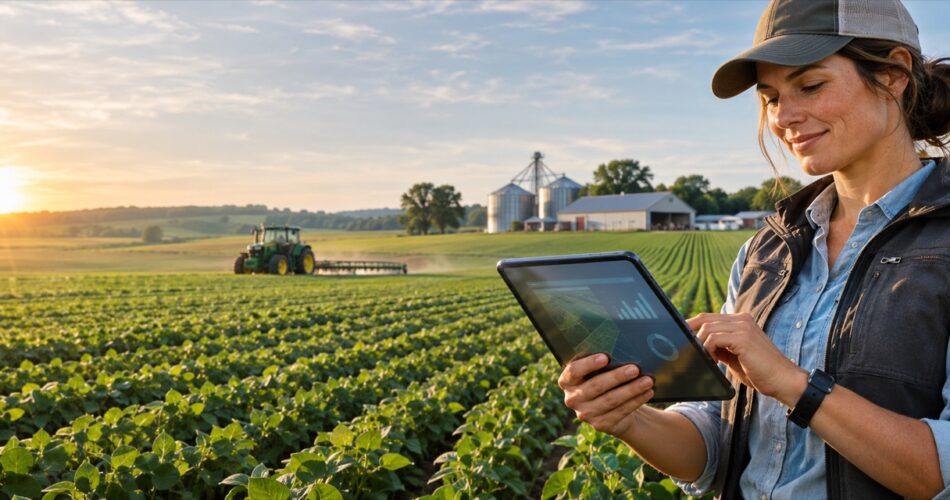
Quick answer: Farm management software is a digital system that brings field activity, crop records, inventory, equipment, labor, finance and reporting into one operational view. The right platform should work in the field, integrate with existing machinery and accounting systems, and convert farm data into decisions—not simply store records.
For agribusinesses that have outgrown spreadsheets or disconnected apps, agriculture custom software development can create a farm platform around the exact crops, workflows, devices and reporting requirements of the business.
What is farm management software?
Farm management software is an application used to plan, record, monitor and analyze agricultural operations. Depending on the business, it may cover crop planning, field tasks, input usage, livestock, machinery, inventory, purchasing, compliance, sales and financial performance.
The important distinction is operational depth. A generic task manager can record that irrigation occurred. A purpose-built farm system can connect the task to a field boundary, soil-moisture reading, water allocation, operator, equipment asset, input cost and yield outcome.
Digital readiness is no longer limited to a small group of farms. The USDA National Agricultural Statistics Service reported that 85% of U.S. farms had internet access in 2025, 82% had a smartphone and 50% used the internet to purchase agricultural inputs. Those figures make mobile-first and connected farm workflows increasingly practical.
Core features of a modern farm management platform
1. Field and crop planning
Users should be able to map farms, fields and management zones; maintain crop histories; plan rotations; assign varieties; and schedule planting, scouting, irrigation, spraying and harvest activities. GIS layers and geofenced tasks help teams connect records to the correct location.
2. Mobile field operations
Agricultural software must work where the work happens. Mobile apps should support offline data capture, photos, voice notes, barcode or QR scanning, GPS location, digital forms and automatic synchronization when connectivity returns.
3. Inventory and input management
Farm inventory management software tracks seed, fertilizer, crop-protection products, feed, fuel, spare parts and harvested products. Useful capabilities include lot and batch traceability, warehouse locations, reorder thresholds, purchase orders, usage by field and unit-cost calculations.
4. Equipment and maintenance
Farm equipment management software should maintain asset histories, hour or mileage readings, preventive-maintenance schedules, inspections, repair work orders, parts consumption and downtime. Telematics integrations can automate readings and alert teams before a preventable failure interrupts a critical field window.
5. IoT and sensor integration
Connected weather stations, soil sensors, irrigation controllers, livestock tags and machinery gateways can send readings into the platform. The software layer validates, normalizes and contextualizes those readings before using them for dashboards or alerts. For more examples, see our guide to IoT applications in agriculture.
6. Financial and performance reporting
Operational records become more valuable when they are connected to cost and outcome data. Dashboards may show cost per acre, yield by field, input variance, equipment utilization, labor productivity, inventory value, margin by crop and forecast versus actual performance.
Farm management software requirements checklist
| Area | Questions to answer |
|---|---|
| Users | Who needs the system—owners, agronomists, field workers, contractors, warehouse teams or customers? |
| Operations | Which workflows create the most delay, duplicate entry, loss or compliance risk? |
| Connectivity | Must the mobile app work offline or in low-bandwidth locations? |
| Data | Which historical spreadsheets, maps, machine files and accounting records must be migrated? |
| Integrations | Which ERP, accounting, weather, GIS, telematics, sensor or marketplace systems must connect? |
| Security | Which roles can view or change farm, financial, employee and customer data? |
| Reporting | Which decisions and regulatory reports should the platform support? |
| Scale | How many farms, fields, devices, users, records and regions will the system support? |
Custom software or an off-the-shelf farm platform?
Off-the-shelf software is often the fastest choice when the business follows common workflows, needs standard reporting and can accept the vendor’s integrations and roadmap. It can also be an effective way to validate digital processes before making a larger investment.
Custom farm management software becomes more attractive when the operation has proprietary workflows, multiple business units, specialized crops, mixed equipment fleets, customer-facing services, unusual traceability rules or an existing ERP and data environment that cannot be replaced.
- Choose configurable software when speed and standard functionality matter most.
- Choose custom development when the workflow itself creates competitive advantage or operational control.
- Choose a hybrid approach when a core platform can be retained but requires custom mobile apps, integrations, analytics or AI capabilities.
How much does farm management software cost?
Cost depends on the number of workflows, user roles, platforms, integrations, devices, reports, security requirements and amount of data migration. For early planning—not as a quote—many projects fall into three broad bands:
- Focused MVP: a mobile and web application for one or two priority workflows, usually with limited integrations.
- Multi-module business platform: field operations, inventory, equipment, reporting, administration and several integrations.
- Enterprise agribusiness system: multiple companies or regions, complex permissions, IoT scale, ERP integration, advanced analytics and migration from legacy systems.
A reliable estimate should follow discovery. The team needs to map users, current systems, data, field conditions and acceptance criteria before assigning a budget or timeline.
Development roadmap
- Discover: interview operators and document the current workflow, exceptions and decision points.
- Prioritize: select the first release based on business impact, data readiness and implementation risk.
- Design: prototype web and mobile experiences with real field users.
- Architect: define data models, APIs, offline synchronization, integrations, security and cloud infrastructure.
- Build and test: deliver in short iterations with demonstrations, field testing and measurable acceptance criteria.
- Pilot: launch with one operation, crop, location or team before broader rollout.
- Improve: monitor adoption, data quality, reliability and business outcomes.
How farm data can support better decisions
The goal is not to collect the largest possible dataset. It is to collect reliable data that supports a defined decision. Examples include scheduling irrigation from soil and weather conditions, identifying fields with rising input cost, predicting an equipment-service window or comparing yield with management practices.
USDA research shows that the reasons operators adopt precision technologies include increasing yields, saving labor time, reducing purchased-input costs and improving soils or environmental outcomes. Adoption also varies substantially by technology and farm size, according to the USDA Economic Research Service. A good software roadmap should therefore match the operation’s scale, economics and team—not copy a generic feature list.
Frequently asked questions
What is the main purpose of farm management software?
Its main purpose is to turn day-to-day farm activity and data into coordinated operations, traceable records and measurable business decisions.
Can farm software work without reliable internet?
Yes. A properly designed mobile application can store approved workflows and records on the device, then synchronize changes when connectivity returns. Conflict handling and security must be designed deliberately.
What systems should farm management software integrate with?
Common integrations include accounting or ERP systems, GIS, weather data, machinery telematics, IoT sensors, inventory and warehouse systems, laboratories, marketplaces and customer portals.
How long does custom farm software take to build?
A focused pilot can often be delivered in a few months, while a multi-module platform may require phased delivery over a longer period. Scope, integrations, data migration and field testing are the biggest timeline drivers.
What should an agribusiness build first?
Start with one workflow that has clear operational pain, usable data and a measurable outcome. Proving value in a focused release reduces risk and creates evidence for the next phase.
Plan your farm software roadmap
DreamzTech designs web, mobile, cloud, AI, GIS and IoT systems for agricultural operations. If your team is replacing spreadsheets, connecting field devices or building a new agritech product, review our agriculture software development services and discuss a phased roadmap with our team.