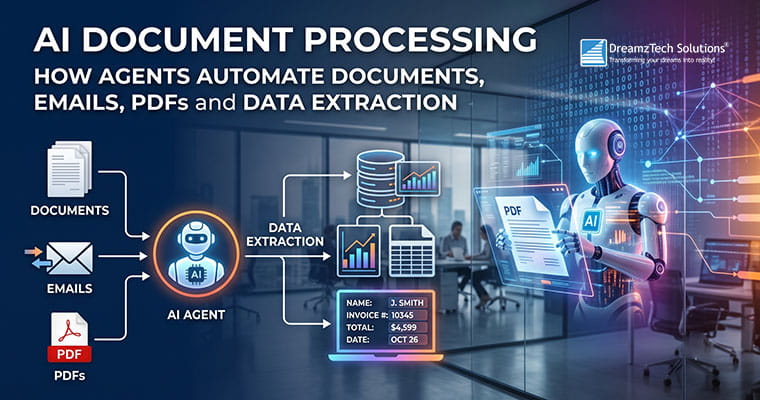
AI Document Processing: How Agents Automate Documents, Emails, PDFs and Data Extraction is designed for teams moving from AI experimentation to a governed business capability. The useful question is not whether a model can produce an impressive answer. It is whether a system can complete a defined job, use approved data and tools, stop at the right boundary, recover from failure, and leave evidence that people can audit.
This guide takes an end-to-end document workflow guide that distinguishes extraction from validation and action. It separates proven engineering patterns from marketing shorthand and gives buyers, product leaders and technical teams a shared way to make decisions.
Quick answer: A reliable AI document processing initiative starts with one bounded workflow, explicit success and failure criteria, narrow permissions, representative evaluation cases, human control over consequential actions, and a measured rollout. Model selection matters, but the surrounding software and operating controls usually determine whether the agent survives production.
What readers should take away
- How to evaluate AI document processing without confusing a prototype with a production system
- Which architecture and operating controls matter most
- How to define a safe first release and measurable acceptance criteria
- Where DreamzTech services, solutions and implementation evidence can support the next step
From OCR to document agents
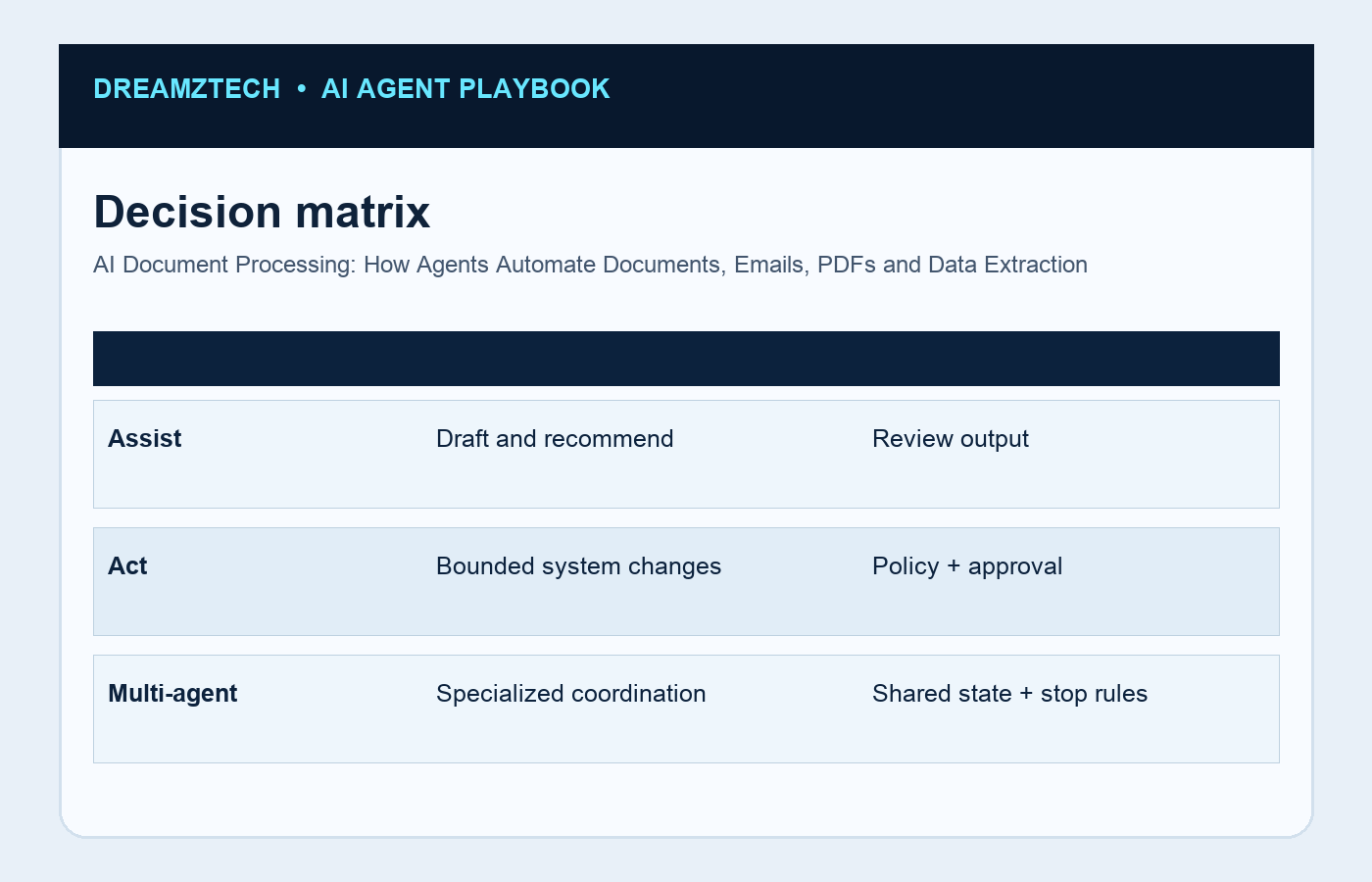
Start by naming the actor, trigger, inputs, systems of record, permitted actions and completion condition. If the team cannot draw the workflow and identify its owner, an agent will inherit that ambiguity. The first design artefact should therefore be an operational boundary, not a prompt.
Document automation is a pipeline: ingest, classify, extract, validate, route exceptions and write structured data to a system of record. Confidence thresholds should reflect field-level risk; a missing invoice total deserves different treatment from a low-confidence marketing tag.
- Define a named owner and measurable completion condition
- Limit tools and data to the minimum required
- Add explicit exception, escalation and recovery paths
- Test with representative and adversarial scenarios
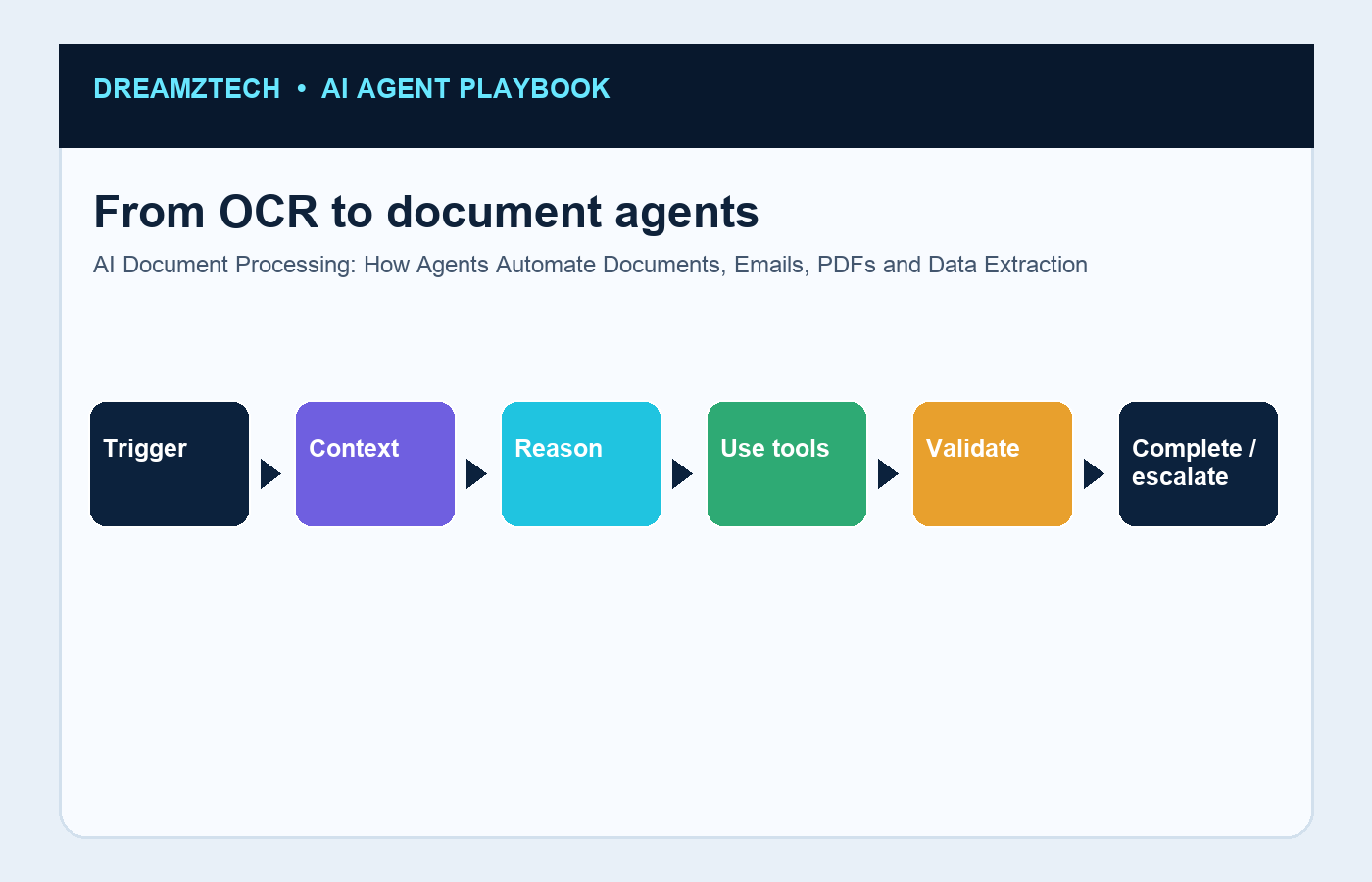
Reference processing pipeline
Separate deterministic business rules from model judgement. Validation, permissions, monetary limits, routing rules and irreversible actions belong in explicit software controls. The model can interpret messy input and select among allowed tools, but it should not invent its own authority.
Document automation is a pipeline: ingest, classify, extract, validate, route exceptions and write structured data to a system of record. Confidence thresholds should reflect field-level risk; a missing invoice total deserves different treatment from a low-confidence marketing tag.
- Define a named owner and measurable completion condition
- Limit tools and data to the minimum required
- Add explicit exception, escalation and recovery paths
- Test with representative and adversarial scenarios
Invoices, contracts, claims and email use cases
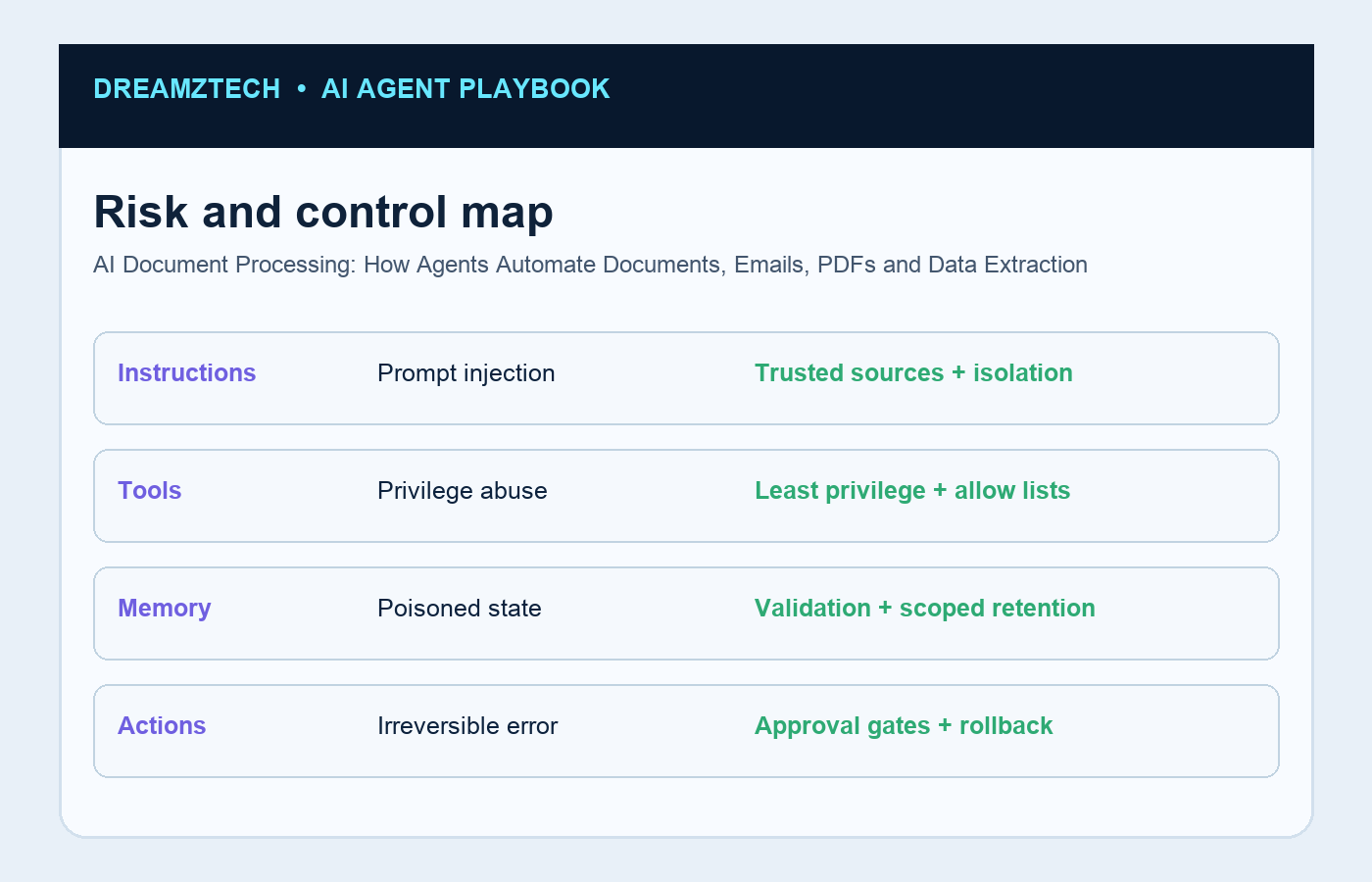
Treat every tool as a contract. Define accepted inputs, returned outputs, timeouts, idempotency behaviour, error classes and the credentials required. Narrow tools make an agent easier to test, easier to revoke and much easier to explain during a security review.
Document automation is a pipeline: ingest, classify, extract, validate, route exceptions and write structured data to a system of record. Confidence thresholds should reflect field-level risk; a missing invoice total deserves different treatment from a low-confidence marketing tag.
- Define a named owner and measurable completion condition
- Limit tools and data to the minimum required
- Add explicit exception, escalation and recovery paths
- Test with representative and adversarial scenarios
Classification, extraction and validation
Ground the agent in the minimum context needed for the task. Retrieval should respect the requesting user's entitlements, cite the underlying record where practical, and abstain when evidence is incomplete. More context is not automatically better context.
Document automation is a pipeline: ingest, classify, extract, validate, route exceptions and write structured data to a system of record. Confidence thresholds should reflect field-level risk; a missing invoice total deserves different treatment from a low-confidence marketing tag.
- Define a named owner and measurable completion condition
- Limit tools and data to the minimum required
- Add explicit exception, escalation and recovery paths
- Test with representative and adversarial scenarios
Confidence thresholds and human review
Evaluate complete trajectories rather than final prose. A successful run uses the right data, chooses the right tool, handles partial failure, requests approval when required and stops when the job is complete. Scenario suites should include normal cases, edge cases, malicious inputs and dependency outages.
Document automation is a pipeline: ingest, classify, extract, validate, route exceptions and write structured data to a system of record. Confidence thresholds should reflect field-level risk; a missing invoice total deserves different treatment from a low-confidence marketing tag.
- Define a named owner and measurable completion condition
- Limit tools and data to the minimum required
- Add explicit exception, escalation and recovery paths
- Test with representative and adversarial scenarios
ERP, CRM and workflow integration
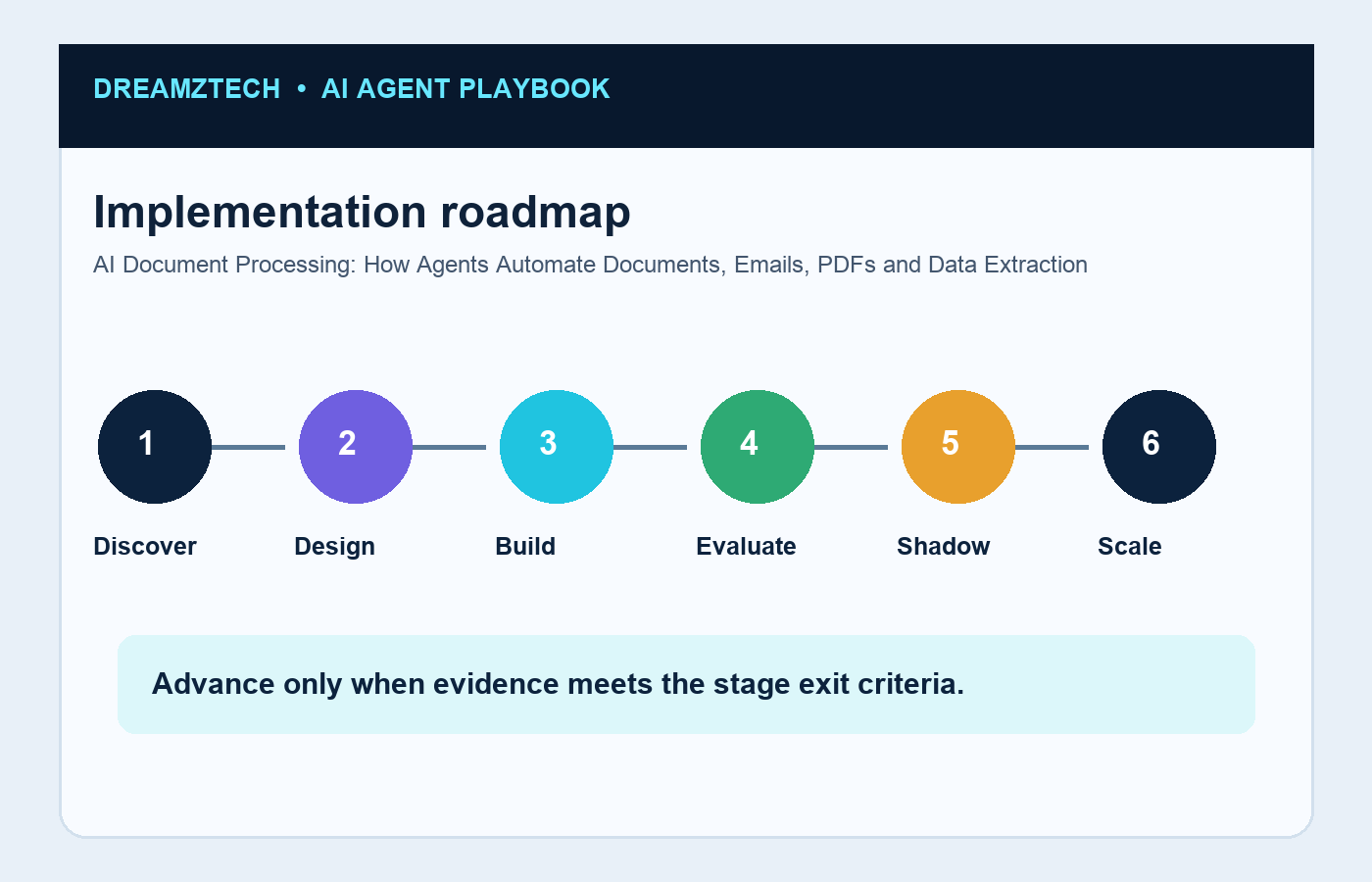
Release in stages: offline evaluation, a sandbox connected to test systems, shadow mode in which the agent proposes without acting, a narrow live slice, and only then broader authority. Each stage needs an owner, exit criteria, a tested disable path and a rollback plan.
Document automation is a pipeline: ingest, classify, extract, validate, route exceptions and write structured data to a system of record. Confidence thresholds should reflect field-level risk; a missing invoice total deserves different treatment from a low-confidence marketing tag.
- Define a named owner and measurable completion condition
- Limit tools and data to the minimum required
- Add explicit exception, escalation and recovery paths
- Test with representative and adversarial scenarios
Quality, cost and throughput metrics
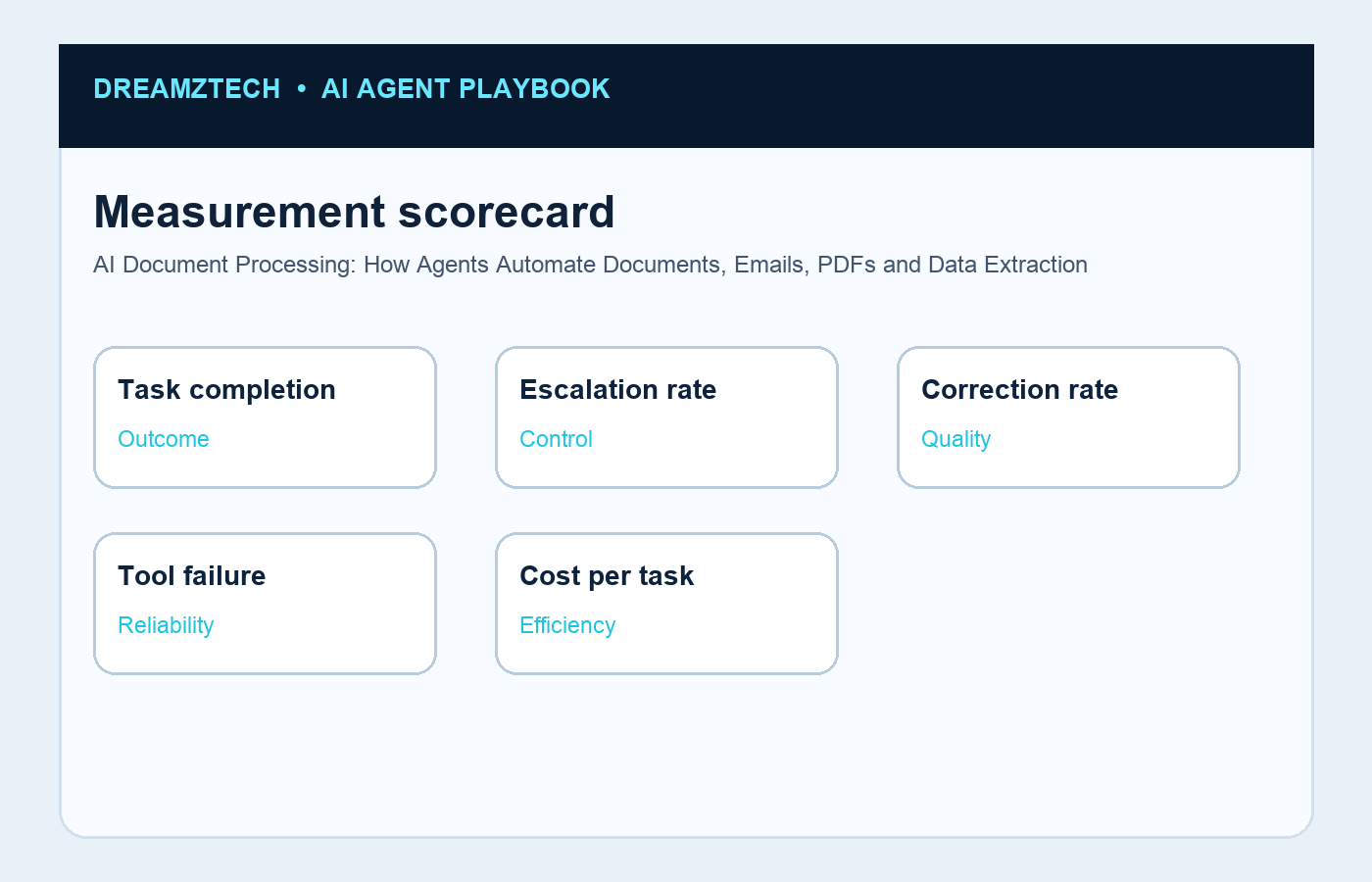
Measure task outcomes, not token activity. Useful metrics include completion rate, escalation rate, correction rate, tool-call failure rate, latency, cost per completed task, policy violations and business impact. Review the failures behind the averages because they reveal where controls or workflow design need attention.
Document automation is a pipeline: ingest, classify, extract, validate, route exceptions and write structured data to a system of record. Confidence thresholds should reflect field-level risk; a missing invoice total deserves different treatment from a low-confidence marketing tag.
- Define a named owner and measurable completion condition
- Limit tools and data to the minimum required
- Add explicit exception, escalation and recovery paths
- Test with representative and adversarial scenarios
Implementation roadmap
Ownership continues after launch. Business operations owns the outcome and policy; engineering owns reliability and integration; security owns control requirements; and a named product owner decides what changes. Models, prompts, APIs and source data drift, so evaluation and review must be continuous.
Document automation is a pipeline: ingest, classify, extract, validate, route exceptions and write structured data to a system of record. Confidence thresholds should reflect field-level risk; a missing invoice total deserves different treatment from a low-confidence marketing tag.
- Define a named owner and measurable completion condition
- Limit tools and data to the minimum required
- Add explicit exception, escalation and recovery paths
- Test with representative and adversarial scenarios
Recommended next step
Use this guide to create a one-page scope, then compare it with DreamzTech’s AI document processing services, document-processing agent development, AI implementation services. The purpose of these links is to move a reader from education to the most relevant service or proof page without making this article compete with the commercial landing page.
Turn one workflow into a production plan
Test a representative document set and define validation thresholds before automating write-back.
Frequently asked questions
What is AI document processing?
A useful answer depends on workflow scope, action authority, data sensitivity, integrations and acceptance criteria. Start with a bounded task, narrow permissions, representative tests and a clear human escalation path; expand only when evidence supports it.
How is IDP different from OCR?
A useful answer depends on workflow scope, action authority, data sensitivity, integrations and acceptance criteria. Start with a bounded task, narrow permissions, representative tests and a clear human escalation path; expand only when evidence supports it.
Can an AI agent read PDFs and emails?
A useful answer depends on workflow scope, action authority, data sensitivity, integrations and acceptance criteria. Start with a bounded task, narrow permissions, representative tests and a clear human escalation path; expand only when evidence supports it.
How accurate is automated extraction?
A useful answer depends on workflow scope, action authority, data sensitivity, integrations and acceptance criteria. Start with a bounded task, narrow permissions, representative tests and a clear human escalation path; expand only when evidence supports it.
When is human review required?
A useful answer depends on workflow scope, action authority, data sensitivity, integrations and acceptance criteria. Start with a bounded task, narrow permissions, representative tests and a clear human escalation path; expand only when evidence supports it.
Editorial note: This article provides general technology and implementation guidance, not legal, medical or compliance advice. Requirements should be validated for the organization, jurisdiction and use case.